Written by Hewitt Roberts, CEO, Certainty Software
Every inspection raises actions. How you close them shapes your auditor’s impression, and your result. So let’s walk through an example corrective action, from finding to fix.
Summary: Inspection corrective action tracking means following every action from an inspection to verified closure: one owner, a due date, evidence of the fix, an independent review and a recorded sign-off, all linked to the original finding. This post follows one high-risk finding through each stage.
Jump to: Raise it · Assign it · Match the risk · Prove the fix · Keep the trail · FAQs
Verified closure lets you show an auditor what was fixed, who checked the fix, and the evidence behind it, for any action on your list.
Most teams already log findings, attach photos and raise actions. The gap usually comes later. For example, the proof of a fix ends up in an email or on a personal phone, and “closed” only means the owner ticked a box.
My example below is a single guard missing from a conveyor, raised during a routine facility safety inspection. At each step, it shows what you should record so the action holds up in an audit, and how Certainty supports that process.
If you want the definitions first, start with What Is CAPA? and Corrective Action vs Verified Closure. Here, I want to show you how it runs in practice.
Step 1: Raise the finding where it was found
During a safety inspection, the inspector on Line 3 answers “No” to “Are all machine guards in place?” That answer starts the action, and the action should stay linked to it.
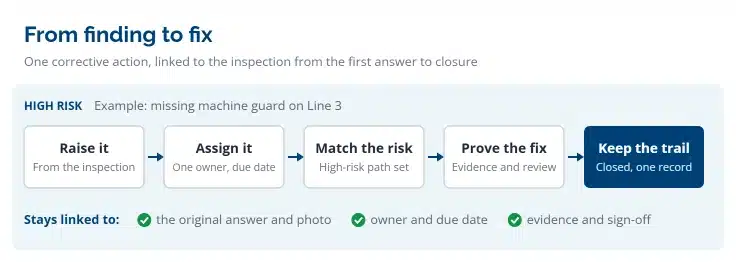
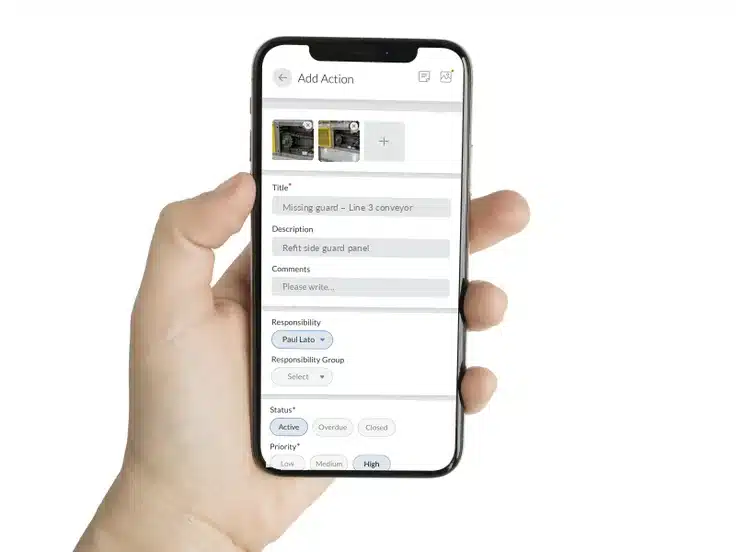
When you raise an action during an inspection, context is important. That includes the site, line, question, answer, photo and inspector. An action typed into a spreadsheet later carries only what someone remembers to write down. For predictable scenarios, use automation where possible, but allow for the unexpected as well. Make sure actions can be created in two ways:
- Automatically. A rule creates and assigns the action when an inspector gives a set answer. For example, any “major non-conformance” answer on any audit creates an action. The inspector doesn’t have to remember, and no site can quietly skip the step.
- Manually on the fly. The inspector can create and assign actions during the inspection along with any findings.
Link the action to the inspection record for context from the start. Every later step depends on that link.
From there, an action moves through different stages, such as To do, then Awaiting approval, and finally it becomes Approved or Closed. The rest of this post follows the example of the missing guard through those stages.
Step 2: Give it one owner and a real due date
Each action should have one named owner and a due date. In this case, the missing guard goes to the Line 3 maintenance lead. The due date should reflect the level of risk.
Notifications and clear communication help keep the action moving. For example:
- The owner gets an email. The owner is notified by email as soon as they become responsible for the action.
- Reminders arrive before the deadline. For example: Your action is due in 5 days.
- Overdue actions escalate. If the due date passes or someone changes the due date, an escalation email goes to the owner’s supervisor.
Set up notifications like this, and safety managers don’t need to chase people by email. You set the rules once, centrally, and every site follows them.
Step 3: Match the process to the risk
Make sure you match the process to the risk. For example, a burned-out storeroom light and a missing machine guard are both findings. However, they don’t need the same follow-up.
- Simple actions close simply. The owner fixes it and marks it complete, with no evidence or sign-off required. As a result, frontline teams spend less time on paperwork for low-risk fixes.
- Serious actions must follow a stricter path. For high-risk findings, a multi-step workflow can require evidence, a manager’s review and a formal sign-off before the action can close.
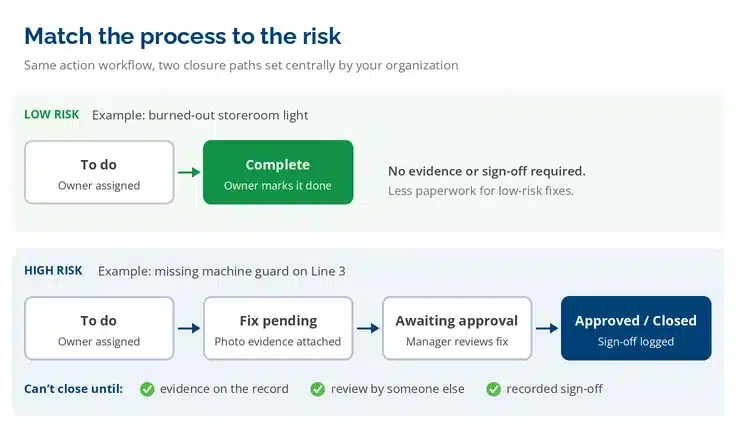
The missing guard in our example is a serious one. It goes down the stricter path, and the person fixing it must not skip steps.
Your organization should decide which findings take which path, and apply that rule consistently. That way, the path doesn’t depend on which site found the problem or who raised it.
Step 4: Prove the fix, then have someone else check it
The maintenance lead refits the guard. Because this is a high-risk action, an auditor will look for three key steps before closure:
- Evidence attached to the action. A photo of the refitted guard, taken on the line and stored against that action. It is not in a separate folder or an email thread.
- A review by someone who didn’t do the work. The manager compares the evidence with the original finding. Does the photo show the right machine? Does it actually address what the inspector found?
- A recorded sign-off. The manager approves, and there is a log of who approved it and when.
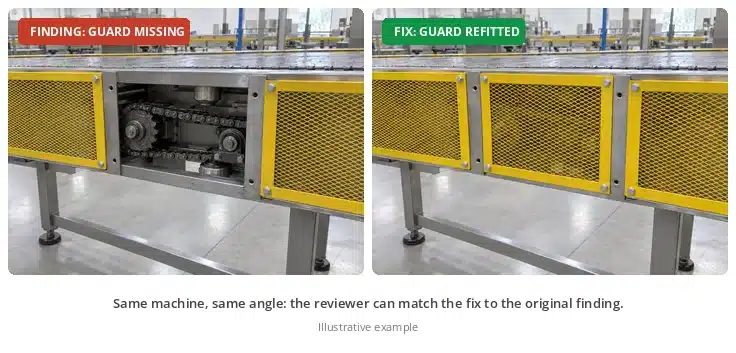
My advice is to have someone other than the owner of the action review every high-risk fix. That second check gives your auditor independent confirmation of the fix. For more on what makes evidence count, see Objective Evidence: What It Is and Why Yours May Not Count.
Step 5: Keep the whole trail in one place
Six months later, an auditor picks the missing guard from the action log. This is when you want one record that shows the full history.
That record should connect every step:
- Finding to action. The action shows the original question, answer, photo, inspector, site and date.
- Action to fix. The evidence, the review and the sign-off sit together on the same record.
- Full history. Logs of every user action and system event, including every changed due date and reassignment.
Before the auditor asks, it is helpful to prepare by rolling up open and overdue actions to see which sites close actions on time and which ones let them drift.
If you already run a corporate action or ERP system, you can push actions into it. You can send them in real time through web services, on a schedule by FTP, or in batch exports. Either way, each action must keep its link to the inspection.
Our CAPA Software guide covers corrective and preventive action in more depth. Read the CAPA guide →
Inspection corrective action tracking at scale
Frontline inspection apps make it quick to raise an action from a phone. For a single site or a small team getting started, that speed is a real strength.
At scale, however, the challenge is consistency rather than speed. When each site builds its own checklists and decides for itself what “closed” means, the action log stops lining up. One site needs a photo and a manager’s sign-off, while another closes with a tick. Both look the same in a report, but only one will satisfy an auditor.
How Certainty keeps every site consistent
When we built Certainty, we took a different approach. Administrators set up the rules up front: the checklists, which answers trigger which actions, and which actions need evidence and sign-off. Frontline teams can’t change those rules on the fly. That is deliberate. This safeguard keeps action data accurate, consistent and comparable across every site.
For the people on the floor, the app is just as easy to use. They answer the question, take the photo and get on with their shift. Meanwhile, the setup keeps the process on track in the background.
DNV uses Certainty to keep non-conformities on due dates with automatic follow-up. See how in the DNV case study.
See how Certainty compares with other inspection apps on our comparisons page.
Key Takeaways:
- Inspection corrective action tracking starts inside the inspection: raise the action there so it keeps the finding’s context.
- Give every action one named owner, a risk-based due date and automatic escalation.
- Match the process to the risk: simple fixes close simply, while serious ones can require evidence, review and sign-off.
- The person who did the fix shouldn’t be the one who approves it.
- Keep finding, fix, evidence and sign-off on one record, so you can show any action to an auditor in one place.
- Set the rules centrally, so every site’s actions mean the same thing.
Frequently Asked Questions (FAQs)
What is inspection corrective action tracking?
It’s the process of following each problem found during an inspection through to a verified fix. That covers the owner, the due date, the evidence and the person who confirmed the fix. The goal is a record that links the original finding to its closure.
Does every corrective action need evidence and sign-off?
No. The owner can close low-risk fixes without them. Higher-risk findings can require evidence, a manager’s review and sign-off before the action closes. Your organization decides which findings follow which path.
Can actions be created automatically from inspection answers?
Yes. In Certainty, Action Workflow rules can create and assign an action when an inspector gives a set answer, such as any “major non-conformance” answer. Inspectors can also create actions during an inspection if an administrator has enabled it for that checklist.
What stages does a corrective action go through?
In Certainty, actions follow their own workflow, just as checklists do. An action moves through stages such as To do or Fix pending, then Awaiting inspection or Awaiting approval, and finally Approved or Closed.
What happens when an action becomes overdue?
Certainty can send reminders before the due date and escalation emails to the owner’s supervisor once it’s overdue. It can also tell the supervisor if someone changes the due date.
Can we keep using our existing action management or ERP system?
Yes. Certainty can push actions into other systems in real time through web services, on a schedule by FTP, or in batch exports.
See it run on one of your findings
Bring a real finding. We’ll walk it to closure.
You might also be interested in

What Is Verified Closure in Audit & Inspection? (And Why CAPA Tools Fall Short)
Closing an action is not the same as proving it. What verified closure means, and what it takes to evidence one.

Objective Evidence: What It Is and Why Yours May Not Count
A photograph is not automatically evidence. The attributes that decide whether a record stands up in an audit.
The ISO 9001 Audit Checklist (2026 Edition): Clauses 4–10, Step by Step
Clause by clause, what an auditor checks and what each finding needs before it can be closed.