Safety Inspection Software: The Complete Guide
Safety inspection software is a digital platform for enterprise EHS teams to plan, conduct, document, and act on workplace safety inspections. It replaces paper checklists and manual logs with timestamped, photo-documented, GPS-tagged records. These records constitute defensible evidence under OSHA 29 CFR 1910 (General Industry) and 29 CFR 1926 (Construction) requirements. At the enterprise level, safety inspection software does more than digitize a clipboard. It creates an immutable audit trail connecting each finding to a corrective action, a responsible owner, and a verified closure date. This is the standard demanded during regulatory inspections, litigation, or insurance proceedings. Enterprise platforms align with ISO 45001:2018 Clause 9 requirements, making a defensible inspection record a compliance obligation, not merely a best practice.
By the Numbers — Safety Inspection at Enterprise Scale
By the Numbers:
34,696 — Federal workplace inspections conducted by OSHA in FY2024, covering 130 million workers across 8 million+ worksites. Maximum fines reach $165,514 per willful violation as of 2025.
30–50% — Reduction in workplace injury rates reported by organizations that implement structured digital inspection programs versus paper-based alternatives.
$181.4 billion — U.S. employer costs for work injuries: wages, medical expenses, and administration, per NSC Injury Facts (2024 estimate).
45,000+ — Organizations globally that have adopted ISO 45001:2018, which requires documented inspection records under Clause 9 (Performance Evaluation). A defensible audit trail is a certification requirement.
Safety inspection software at a glance
| What it is | An enterprise digital platform for conducting, documenting, and acting on workplace safety inspections with timestamped, photo-documented, GPS-tagged records. |
| Scope of this guide | Enterprise safety inspection software for multi-site manufacturing, construction, oil & gas, utilities, and logistics organizations subject to OSHA 29 CFR 1910 / 1926 or ISO 45001 certification. |
| Who runs it | EHS directors, safety managers, compliance officers, and operations leaders — with executive accountability up to the COO and Chief Safety Officer. |
| Key regulations | OSHA 29 CFR 1910, 29 CFR 1926, ISO 45001:2018, NFPA 70E. |
| Typical workflow | Plan → Inspect (mobile, offline-capable) → Capture evidence → Triage findings → Assign CAPA → Verify closure → Roll up. |
| Typical outcomes | Defensible audit trails for OSHA enforcement; ISO 45001 certification readiness; 30–50% workplace injury reduction; lower TRIR and workers’ comp costs. |
Table of contents
- What Is Safety Inspection Software?
- Safety Inspection vs. Safety Audit vs. EHS Software: What’s the Difference?
- What OSHA Requires: Inspection Mandates Under 29 CFR 1910 and 29 CFR 1926
- How to Conduct a Safety Inspection: The 4-Step Framework for Enterprise Teams
- Types of Safety Inspections Every EHS Program Needs
- Key Features of Enterprise Safety Inspection Software
- Building a Defensible Audit Trail: What Audit-Ready Actually Means
- Safety Inspection Software by Industry: Manufacturing, Construction, and Warehousing
- From Compliance Checkbox to Safety Culture: How Inspection Data Drives Continuous Improvement
- Choosing Safety Inspection Software: An Enterprise EHS Decision Framework
- Measuring Safety Inspection ROI: TRIR, Leading Indicators, and the Cost of Not Inspecting
- How Certainty Software Supports Enterprise Safety Inspection Programs
- Frequently Asked Questions (FAQs)

What Is Safety Inspection Software?
Definition and Core Capabilities
Safety inspection software is a digital platform for organizations to plan, conduct, document, and act on workplace safety inspections. It replaces paper checklists and manual logs with timestamped, photo-documented records. These records are accessible in real time from any device. At the enterprise level, safety inspection software does more than digitize a clipboard. It creates an immutable audit trail connecting each finding to a corrective action, a responsible owner, and a verified closure date. This provides the defensible evidence EHS teams need during regulatory inspections, litigation, or insurance proceedings.
Certainty’s safety inspection platform is an enterprise platform that differs from consumer tools in key ways. It provides multi-site rollup dashboards, configurable templates mapped to OSHA 29 CFR 1910 and 1926, and offline-capable mobile apps. It also supports evidence capture for Safety Management System (SMS) activities including HIRA, PSSR, and behavior-based safety (BBS) inspections. Safety inspection software provides scheduled, documented verification evidence for the Administrative Controls layer of NIOSH’s Hierarchy of Controls.
How Safety Inspection Software Works
The core workflow of enterprise safety inspection software follows five stages: schedule, inspect, document, assign corrective action, and verify closure. In the scheduling stage, the system automatically generates inspection assignments. These are based on regulatory mandates (such as OSHA 29 CFR 1910.147 LOTO periodic reviews), internal policy calendars, or equipment maintenance schedules. Automated reminders are sent to assigned inspectors. During the inspection, inspectors work from a digital checklist, capturing photo evidence, GPS coordinates, and timestamps at each finding. When the inspector submits the completed form, a real-time record is generated and stored — no manual data entry, no transfer delay.
Non-conforming findings automatically trigger CAPA assignments — routed to a responsible owner with a due date and escalation path. Finally, the CAPA closure workflow requires the responsible party to submit verification evidence before the finding is marked closed. This evidence may be a follow-up photo, a signed completion record, or a second inspector sign-off. This end-to-end chain is what transforms a digital checklist into a defensible audit trail.
Paperless vs. Paper Inspection Systems
The shift from paper-based to digital inspection systems is not simply a matter of convenience — it is a compliance risk reduction. Paper inspection records are vulnerable to loss, illegibility, inconsistent completion, and post-inspection alteration. They cannot be searched, aggregated, or trended across sites without manual re-entry. In a regulatory or litigation context, handwritten checklists provide a weak evidentiary foundation compared to a timestamped, GPS-tagged, photo-documented digital record. As a result, organizations using structured digital inspection programs report 30–50% reductions in workplace injury rates compared to paper-based alternatives. This difference is driven not merely by the technology. The consistency and accountability that digital workflows enforce are equally important. Enterprise safety inspection software also enables organizations to digitize their existing paper checklists in hours. Legacy forms map to configurable digital templates, preserving the institutional knowledge embedded in those forms.
Who Needs Safety Inspection Software?
Safety inspection software is built for EHS directors, safety managers, compliance officers, and operations leaders at multi-site enterprises. It serves organizations where inspection volume, geographic distribution, and regulatory complexity exceed what spreadsheets and paper can reliably manage. The defining qualifier is multi-site scale: a single-location business may manage inspections manually. A manufacturer with twelve plants, or a contractor operating on fifty active job sites simultaneously, cannot maintain regulatory defensibility without a platform. Highest-adoption industries include manufacturing (OSHA 29 CFR 1910: LOTO, confined space, PSM) and construction (29 CFR 1926: fall protection, scaffolding, excavations). Oil and gas (FLHA, permit-to-work, PSM), utilities, and distribution and logistics follow closely.
Any organization subject to OSHA requirements or pursuing ISO 45001 certification requires a documented inspection system capable of producing audit-ready evidence. First, understand the difference between a safety audit and a safety inspection. Then, learn the related distinction between hazard and risk. Together, these are the first step in selecting software that handles both correctly.
Safety Inspection Software vs. Generic EHS Platforms
The enterprise EHS software market spans a spectrum from point-solution inspection tools to full Environmental, Health, and Safety management platforms. Point-solution tools — consumer-grade apps for individual workers or small businesses — offer simple checklists and basic photo capture. They lack the multi-site architecture, regulatory template depth, CAPA workflows, and role-based access controls enterprise organizations require. Full EHS platforms function as enterprise-grade systems-of-record for the entire safety management lifecycle. They connect inspections, incident management, training tracking, MSDS management, environmental monitoring, and corrective action in a single data model. Certainty occupies the enterprise platform tier while maintaining inspection-specific depth that broader EHS suites sometimes sacrifice in favor of generalist coverage. The practical question is not “which app is easiest?” but “which platform produces evidence that holds up under OSHA enforcement or in discovery?”

Safety Inspection vs. Safety Audit vs. EHS Software: What’s the Difference?
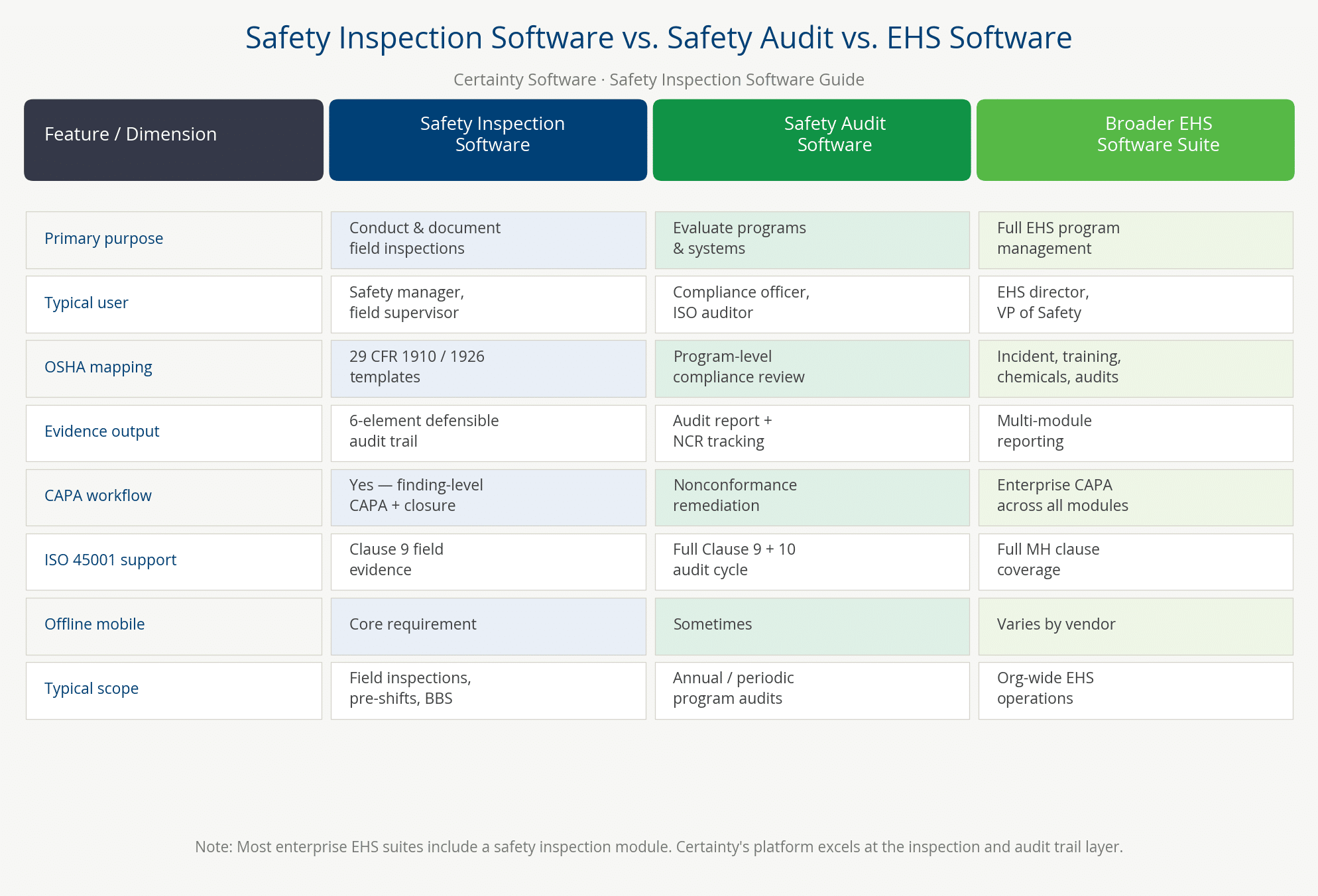
A safety inspection is a routine, scheduled examination of a workplace, equipment, or work practice to identify hazards before they cause incidents. In practice, inspections are conducted daily, weekly, or monthly depending on regulatory requirements.
By contrast, a safety audit is a broader, deeper evaluation of an organization’s entire safety management system. It is measured against a standard such as OSHA PSM, ISO 45001, or internal policy. Typically, audits are conducted quarterly or annually. They focus on systemic compliance rather than individual hazard identification.
Meanwhile, EHS software is the overarching platform category that encompasses both. It is a full Environmental, Health, and Safety management system covering incident management, training, environmental monitoring, and more. Within that platform, safety inspection software operates as the field-execution module. Understanding these distinctions matters because the right software must handle all three — not just one. For a deeper treatment, see Certainty’s guide to the difference between a safety audit and a safety inspection.
Inspection vs. Audit vs. EHS Platform: A Side-by-Side Comparison
| Dimension | Safety Inspection | Safety Audit | EHS Software (Full Platform) |
|---|---|---|---|
| Purpose | Identify field-level hazards in real time | Evaluate systemic compliance against a standard | Manage the full EHS lifecycle — inspections, incidents, training, environment |
| Frequency | Daily, weekly, or monthly per OSHA mandate or internal policy | Quarterly or annually; tied to certification cycles | Continuous — always-on system of record |
| Scope | Specific equipment, work area, or task | Entire safety management program or system | Organization-wide across all EHS domains |
| Regulatory Trigger | OSHA 29 CFR 1910/1926 sub-standard requirements | ISO 45001 Clause 9; internal audit schedule; OSHA PSM | All applicable regulations across EHS domains |
| Output | Inspection record with findings, photos, and CAPA assignments | Audit report with non-conformances, recommendations, and action plan | Multi-domain compliance dashboard, incident log, training matrix, audit history |
| Primary User | Field inspector, safety manager, supervisor | Internal auditor, external certification body, OSHA compliance officer | EHS Director, VP Operations, Compliance Officer |
Three Types of Safety Audits Defined
Enterprise EHS programs encounter three distinct audit types, each serving a different compliance function. A compliance audit verifies that specific OSHA or ISO standards are met — examining records, interviewing workers, and testing procedures against requirements. A program audit evaluates whether an organization’s internal safety program elements are implemented as designed. These elements include written programs, training records, inspection schedules, and incident investigation procedures. It is less about external standards and more about internal discipline. A management system audit is the most comprehensive type. It is a full ISO 45001 Clause 9 (Performance Evaluation) review of the entire Occupational Health and Safety Management System (OHSMS). The review assesses effectiveness, continual improvement, and conformance with the standard’s requirements.
ISO 45001:2018 replaced OHSAS 18001 in March 2018 as the international benchmark. Safety inspection software provides the documented evidence package — completed checklists, CAPA records, and corrective action histories. This evidence feeds all three audit types and satisfies external auditors during certification reviews.
When to Use an Inspection vs. an Audit
The practical decision rule is straightforward: use inspections for ongoing, operational hazard identification and use audits for periodic, strategic compliance verification. Inspections are field-level activities — a safety manager walks the floor, checks equipment, observes work practices, and documents findings in real time. They are triggered by operational rhythms (pre-shift, weekly, monthly) or regulatory mandates such as OSHA’s periodic LOTO procedure reviews under 29 CFR 1910.147. Audits are management-level activities — an auditor examines systems, records, and programs to assess whether the safety framework is functioning. A well-run enterprise EHS program runs both in parallel: daily inspections generate the evidence that quarterly and annual audits review. Safety inspection software is the operational engine that makes inspections consistent enough to produce credible audit evidence.
EHS Software: Superset and Subset Relationship
Safety inspection software is a subset of EHS software — the field-execution module within a broader environmental, health, and safety management platform. This matters because a standalone inspection point-solution may create integration gaps with incident management, training, and environmental reporting systems. For a related comparison, see Certainty’s analysis of manual versus automated safety audits.
What OSHA Requires: Inspection Mandates Under 29 CFR 1910 and 29 CFR 1926
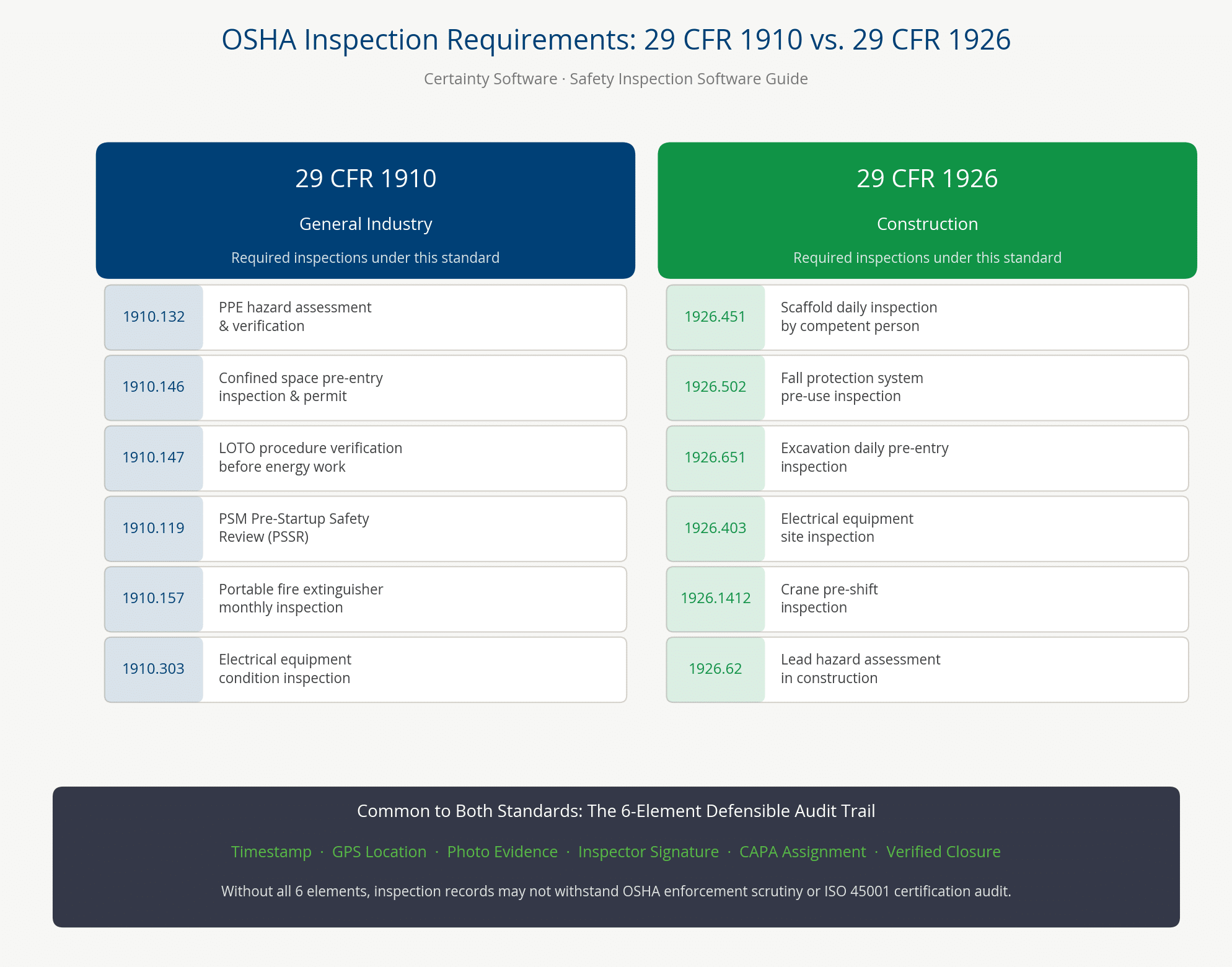
OSHA does not mandate a universal inspection checklist — instead, it embeds inspection requirements within more than 800 individual standards. For general industry, OSHA 29 CFR 1910 mandates periodic inspection of equipment, PPE, and electrical systems. Key standards include 1910.217 (mechanical power presses), 1910.147 (lockout/tagout), 1910.146 (confined space entry), 1910.132 (PPE), and Subpart S (electrical). For construction, OSHA 29 CFR 1926 requires pre-shift inspections of scaffolding (1926.451), fall protection systems (1926.502), excavations (1926.651), and cranes (1926.1412).
Enterprise safety inspection software converts these scattered mandatory verification points into scheduled, documented, trackable inspection events. This creates the defensible evidence record that OSHA compliance officers demand when they arrive for a formal inspection. Understanding which specific sub-standards apply to your operations is the foundation for building a legally defensible inspection program. Organizations should ensure inspection data integrates with OSHA recordable vs. reportable incidents — two distinct obligations inspection software helps manage in parallel.
OSHA 29 CFR 1910 — General Industry Inspection Requirements
General industry operations face the most extensive OSHA inspection mandate landscape. The table below identifies the five most frequently cited 29 CFR 1910 sub-standards with mandatory periodic inspection requirements. It shows the nature of each requirement and the minimum inspection frequency OSHA prescribes or implies:
| Standard | Requirement | Inspection Trigger / Frequency |
|---|---|---|
| 1910.147 — Lockout/Tagout (LOTO) | Periodic inspection of energy control procedures; employer must certify each procedure reviewed annually | At least annually per energy control procedure |
| 1910.146 — Confined Space Entry | Pre-entry atmospheric testing, equipment inspection, and permit completion before each entry | Before each permit-required confined space entry |
| 1910.119 — Process Safety Management (PSM) | Pre-Startup Safety Review (PSSR) before commissioning new or modified processes; compliance audit every 3 years | Before each process startup; compliance audit every 3 years |
| 1910.132 — PPE | Hazard assessment to determine PPE requirements; employer must certify assessment in writing | Before initial PPE selection and provision; when workplace conditions change materially enough to affect hazard profile |
| 1910 Subpart S / NFPA 70E — Electrical Safety | NFPA 70E arc flash risk assessment; electrical equipment inspection per manufacturer and OSHA standards | Periodic; arc flash studies typically every 5 years or when system changes |
OSHA 29 CFR 1926 — Construction Safety Inspection Requirements
Construction sites face a parallel and equally demanding inspection mandate landscape under 29 CFR 1926. Fall protection systems (1926.502) must be inspected before every use. This requirement generates hundreds of documented records across a busy construction project in a single month. Scaffold pre-shift inspections (1926.451) must be conducted by a “competent person” as defined by OSHA, and that designation must itself be documented. Excavation inspections (1926.651) must occur daily and after any rain event or other condition that could affect stability. Crane and derrick inspections (1926.1412) operate on a layered schedule: pre-shift, monthly, and annual — each with its own documentation standard. The table below summarizes the four most frequently cited 29 CFR 1926 sub-standards with mandatory periodic inspection requirements:
| Standard | Requirement | Inspection Trigger / Frequency |
|---|---|---|
| 1926.502 — Fall Protection | Pre-shift inspection of all fall protection equipment (harnesses, lanyards, anchor points, guardrails) | Before each use / every shift |
| 1926.451 — Scaffolding | Pre-shift inspection by a competent person before each work shift and after any event affecting structural integrity | Before each shift; after adverse events |
| 1926.651 — Excavations | Daily inspection by a competent person before work begins and as needed throughout the shift | Daily; after rain or hazard-changing events |
| 1926.1412 — Cranes and Derricks | Pre-shift inspection, monthly inspections, and annual inspections; documentation required for each | Before each shift; monthly; annually |
OSHA Recordkeeping: Forms 300, 300A, and 301
OSHA’s recordkeeping standards (29 CFR 1904) require covered employers to maintain three specific forms. See Certainty’s guide to the differences between OSHA 301, 300, and 300A for each form’s purpose and timing.
- OSHA 300 Log of Work-Related Injuries and Illnesses — the ongoing incident log.
- OSHA 300A Annual Summary — the annual aggregate posted each February 1–April 30.
- OSHA 301 Incident Report — the detailed incident narrative completed within 7 days of each recordable event.
Safety inspection software creates the upstream data that populates 300-log entries. Every documented near-miss, equipment failure finding, and behavioral observation that escalates to a recordable incident has an inspection record at its origin. Organizations with mature inspection programs have lower TRIR not merely because they catch hazards earlier. Their documented corrective action evidence also demonstrates good-faith compliance, which influences OSHA enforcement outcomes.
Canadian and International OHS Inspection Requirements
Enterprise organizations operating beyond U.S. borders face parallel inspection mandates in other jurisdictions. CSA Z45001 (adopted 2019) is Canada’s equivalent of ISO 45001 and requires documented inspection programs under its Clause 9 performance evaluation framework. Provincial legislation — including Ontario’s OHS Act and Alberta’s OHS Act — embeds inspection frequencies analogous to OSHA standards. In the United Kingdom, the Health and Safety at Work Act 1974 and supporting regulations mandate documented equipment inspection regimes. These include the Provision and Use of Work Equipment Regulations 1998 and the Lifting Operations and Lifting Equipment Regulations 1998. Australia’s Work Health and Safety Act (WHS Act) imposes similar obligations at the Commonwealth and state levels. Enterprise safety inspection software configured for multi-jurisdiction operations must support template libraries mapped to each jurisdiction’s specific requirements — not just OSHA.
How to Conduct a Safety Inspection: The 4-Step Framework for Enterprise Teams
Conducting an effective workplace safety inspection requires more than walking the floor with a checklist. At the enterprise level, it demands a repeatable, documented process. The four essential steps are:
- Plan — select the inspection type, assign the inspector, confirm the relevant OSHA standard or ISO 45001 clause, and schedule.
- Execute — conduct the inspection using a standardized digital checklist, capturing photographic evidence, GPS location, and timestamps for every finding.
- Document — generate the inspection record in real time, including corrective action assignments with responsible parties and due dates.
- Verify — confirm corrective actions are completed, verified with follow-up evidence, and closed in the audit trail.
This 4-step framework is the operational backbone that enterprise safety inspection software automates. It converts an ad hoc walkthrough into a defensible compliance record.
Step 1 — Plan: Scheduling, Standard Selection, and Inspector Assignment
Effective inspection planning begins with three decisions: what to inspect, who will inspect it, and which regulatory standard governs. Enterprise safety inspection software automates scheduling through configurable calendars that pull from OSHA mandatory inspection requirements and internal policy frameworks. For example, an organization running OSHA 1910.147 LOTO procedures must schedule at least one annual inspection of each energy control procedure. A requirement the software tracks per procedure, per machine, per site. Inspector assignment should match competency requirements: OSHA’s standard for confined space entry (1910.146) requires a “competent person” designation. The software should enforce that credential check before assigning the inspection.
Pre-inspection preparation — reviewing prior findings, outstanding CAPAs, and recent near-miss reports — is built into the workflow. Each inspection builds on institutional knowledge rather than starting from zero. A field level hazard assessment (FLHA) is completed at the planning stage for high-risk tasks in oil and gas, utilities, and construction.
Step 2 — Execute: Digital Checklist, Photo Evidence, GPS and Timestamp Capture
The execution phase is where offline capability becomes critical. Manufacturing floors, remote construction sites, and underground confined spaces all present connectivity challenges that would cripple a cloud-only inspection tool. Enterprise safety inspection software supports fully offline inspection completion. The inspector works through the checklist on a mobile device with no active connection, capturing photos, GPS coordinates, and system timestamps automatically. The completed record syncs to the central platform the moment connectivity is restored.
OSHA recommends near-miss reporting as a leading indicator of safety performance. The execution phase is when most near-miss events are identified. The software’s near-miss workflow captures these events in the same timestamped record chain as formal inspection findings. Every photo attached at a specific checklist item becomes part of the immutable evidence record. Every on-screen signature and GPS coordinate recorded at a finding joins that record — and the whole survives regulatory scrutiny.
Step 3 — Document: Findings, Corrective Actions, and Digital Signatures
The documentation phase is what separates a safety inspection from a safety walk. In paper-based systems, documentation happens after the fact: notes are transcribed, photos attached manually, and CAPAs issued by email or verbal instruction. Enterprise software generates the inspection record in real time: as each checklist item is completed, the record is built. Non-conforming findings automatically generate corrective action assignments. Within the same workflow, the inspector identifies the hazard, photographs it, selects the responsible party, and sets the due date and severity.
Digital signatures from the inspector — and optionally from the site supervisor — are captured on-screen and embedded in the record. This satisfies the OSHA requirement for documented, signed inspection records under standards like 1910.147 LOTO. A Pre-Startup Safety Review (PSSR) conducted before commissioning new or modified equipment creates a documentation chain required by OSHA 1910.119 (PSM).
Step 4 — Verify: CAPA Closure, Follow-Up Inspection, and Trend Analysis
The verification phase closes the evidence loop. A corrective action that is assigned but never verified as complete is a gap in the defensible audit trail. Specifically, OSHA compliance officers specifically look for CAPAs that were opened but never closed. Enterprise software enforces CAPA closure verification. The responsible party must submit a completion record — typically a follow-up photograph demonstrating the hazard has been corrected. In high-severity cases, a second inspector must perform a physical verification before the CAPA can be closed.
This step also links individual inspection events to the organization’s broader safety performance trend. Root cause analysis (RCA) at the CAPA level identifies whether a hazard stems from a process gap, equipment failure, or behavioral factor. This evidence chain satisfies ISO 45001 Clause 10 (Improvement). Aggregated CAPA closure data feeds directly into TRIR calculations, leading indicator dashboards, and executive safety reports.

Types of Safety Inspections Every EHS Program Needs
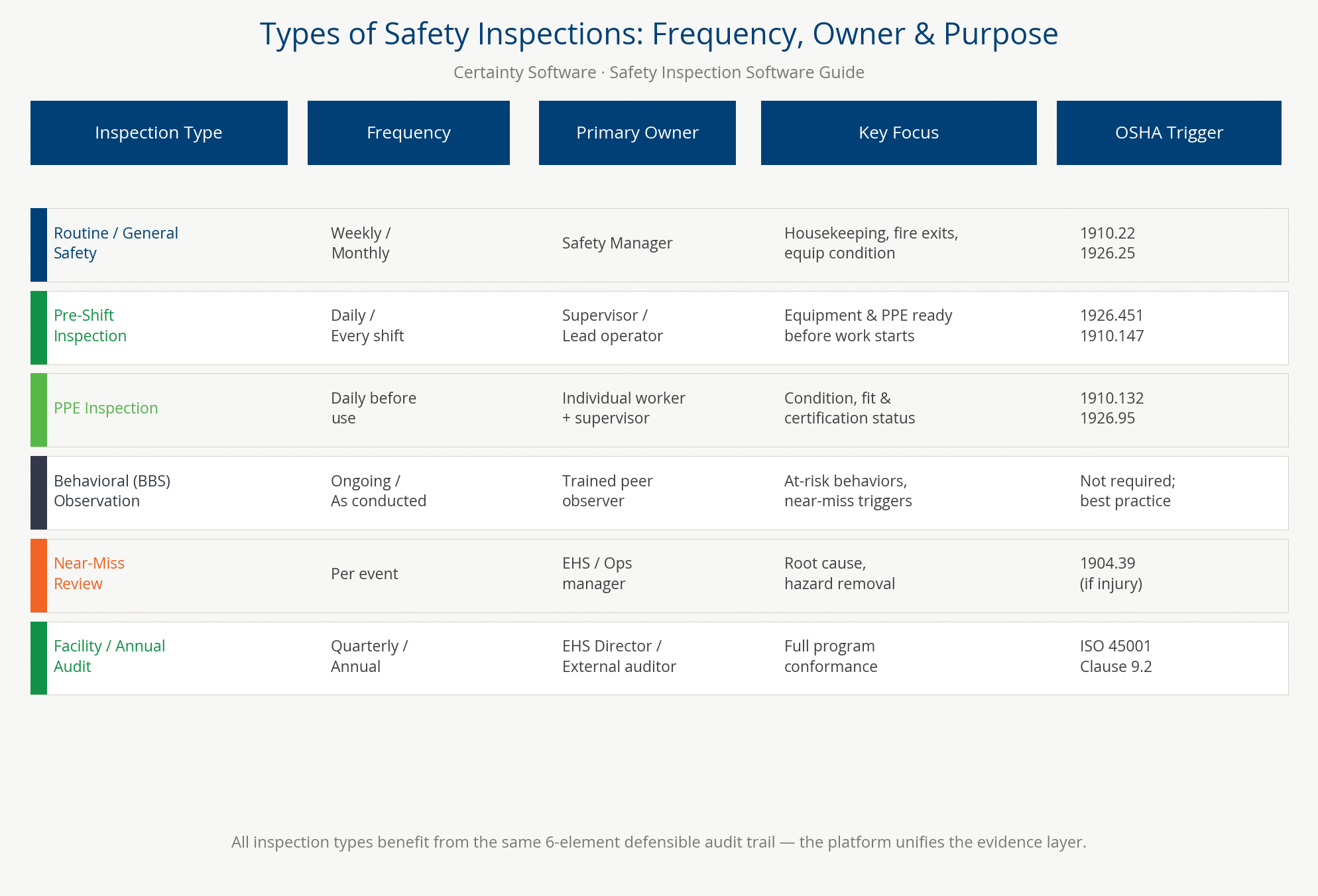
Enterprise EHS programs typically require six categories of safety inspections. Each is triggered by a different regulatory mandate or operational need:
- Routine general inspections — weekly or monthly OSHA-mandated walkthroughs.
- Pre-task inspections — jobsite safety inspections and field level hazard assessments completed before every high-risk task.
- Regulatory compliance inspections — mapped to specific OSHA or ISO 45001 requirements.
- Equipment and asset inspections — including PPE inspections conducted pre-shift and periodically per manufacturer and OSHA standards.
- Behavior-based safety observations — structured BBS programs that identify at-risk behaviors before incidents occur.
- Near miss reporting for hazardous events that did not result in injury.
- Facility safety inspections.
- Management system audits — annual ISO 45001 or OHSAS 18001 compliance reviews.
The right safety inspection software handles all six types from a single platform. This eliminates the disconnected spreadsheets, emailed checklists, and paper logs that create evidence gaps when a regulator arrives. Every pre-task field level hazard assessment and JSA/JHA produces a documented HIRA record that feeds the organization’s ongoing risk register.
Pre-Task Inspections: Field Level Hazard Assessments (FLHA)
A field level hazard assessment (FLHA) is a structured pre-task inspection completed by workers before beginning a high-risk activity. It identifies site-specific hazards and confirms that controls are in place. It also documents the team’s awareness of the risks involved. FLHAs are mandatory in oil and gas across Canada and are becoming standard practice in construction, utilities, and heavy manufacturing. They differ from job safety analyses (JSAs) in their immediacy. A JSA is a planned, step-by-step analysis of a job task developed in advance. By contrast, an FLHA is a real-time, on-site assessment of conditions as they exist at the moment work begins.
Enterprise safety inspection software supports FLHAs through mobile-first digital forms. Workers complete these on a tablet or smartphone before each task, with photo capture and GPS tagging at the specific work location. The completed FLHA record links automatically to the day’s work permit and the site’s inspection history. This creates the evidence trail that demonstrates due diligence before every high-risk work activity. See Certainty’s fire safety inspection checklist as an example of a configurable FLHA-style template for fire risk scenarios.
Equipment and Asset Inspections: LOTO and Pre-Shift Checks
Equipment and asset inspections are among the highest-volume, most frequently cited inspection types in OSHA enforcement data. OSHA 1910.147 (Lockout/Tagout) mandates periodic inspection of every energy control procedure at least annually. In complex manufacturing environments with hundreds of machines, this generates a substantial documentation load. Pre-shift inspections of vehicles, forklifts, cranes, and mobile equipment are required before every operating shift under applicable OSHA standards and manufacturer requirements. Fire protection equipment — extinguishers, sprinkler systems, emergency lighting — must be inspected monthly and annually per NFPA standards.
PPE — harnesses, respirators, protective eyewear, SCBA equipment — must be inspected before each use and documented for high-stakes applications. Enterprise software manages this volume through asset-linked inspection schedules. Each piece of equipment has its own inspection history. Overdue inspections trigger automatic alerts to site supervisors, preventing compliance gaps across hundreds of assets and multiple sites.
Behavioral Safety Observations (BBS)
Behavior-based safety (BBS) observations are structured inspections of worker behavior — not equipment or environment — designed to identify at-risk behaviors early. A BBS observation program trains supervisors and peers to observe specific task behaviors against a defined checklist of safe and at-risk behaviors. Observers record findings without punitive intent and provide immediate feedback to the worker. The American Society of Safety Professionals (ASSP) recognizes BBS programs as a leading indicator of safety culture maturity. The DuPont Bradley Curve’s transition from “Dependent” to “Independent” safety culture is driven by this shift. Specifically, it moves from reactive incident reporting to proactive behavioral observation.
Enterprise safety inspection software converts BBS observations into structured, searchable records that feed behavioral trend analysis. These records show which tasks, locations, or shifts generate the highest at-risk behavior frequency. They also show whether observation-driven coaching is moving those rates in the right direction. See Certainty’s BBS observations guide for program design details — including the BBS observation checklist as a configurable starter template.
Pre-Startup Safety Reviews (PSSR)
A Pre-Startup Safety Review (PSSR) is a mandatory inspection conducted before commissioning new or significantly modified equipment, processes, or facilities. Under OSHA 1910.119 (Process Safety Management of Highly Hazardous Chemicals), a PSSR must confirm three things. First, that construction and equipment conform to design specifications. Second, that safety, operating, maintenance, and emergency procedures are in place and adequate. Third, that initial startup is safe. PSSRs are conducted in chemical manufacturing, oil refining, petrochemicals, and any facility handling highly hazardous chemicals above OSHA’s threshold quantities. Enterprise safety inspection software manages PSSRs through multi-stage digital checklists. These route through engineering, operations, and safety sign-off before the process can be marked ready for startup. The result is a documented evidence chain that OSHA PSM compliance auditors examine first.
Management System Audits: ISO 45001 Clause 9
Annual management system audits represent the most comprehensive inspection type in the enterprise EHS calendar. Under ISO 45001:2018 Clause 9 (Performance Evaluation), organizations must conduct internal audits at planned intervals. These audits determine whether the OHSMS conforms to the organization’s own requirements and the standard’s requirements. They also assess whether the system is effectively implemented and maintained. These audits require an evidence package: completed inspection records, CAPA closure histories, near-miss reports, training records, and incident investigation documentation. Safety inspection software generates this evidence package automatically. Every inspection, closed CAPA, and BBS observation is available in a searchable, exportable format ready for the external certification body. Organizations without a software-generated audit trail typically spend weeks manually assembling evidence packages before an ISO 45001 surveillance audit. Software-driven organizations export the complete evidence record in hours.
Key Features of Enterprise Safety Inspection Software
Enterprise safety inspection software must do more than digitize a paper checklist. It must create records that satisfy OSHA compliance officers, ISO 45001 auditors, and legal counsel. The eight feature categories that separate enterprise platforms from consumer tools are:
- Offline-capable mobile inspections with automatic sync.
- Configurable checklists pre-mapped to OSHA 29 CFR 1910/1926 and ISO 45001.
- Photo, GPS, and timestamp evidence capture at the finding level.
- Integrated corrective action (CAPA) workflows with escalation and verified closure.
- Multi-site dashboard with site-level and program-level rollup reporting.
- Behavioral safety observation (BBS) modules.
- Near-miss reporting linked to leading indicator tracking.
- Role-based access control that supports contractor and vendor safety credential management.
Each of these features maps directly to the “defensible evidence” standard that an enterprise EHS program must meet. Enterprise EHS teams often align audit protocols with ANSI/ASSP standards. Evaluate whether the vendor’s template library covers ASSP A10 construction safety requirements and the full suite of OSHA 1910/1926 sub-standards. Safety inspection software provides scheduled, documented verification evidence for the Administrative Controls layer of NIOSH’s Hierarchy of Controls.
Mobile App and Offline Capability
Offline-capable mobile inspection is not a convenience feature for enterprise EHS — it is a compliance requirement. Manufacturing floors, remote construction sites, confined spaces below ground level, and oil and gas field locations all present connectivity challenges. Enterprise-grade safety inspection software downloads the inspection form, reference materials, and asset register to the device before the inspector enters the field. The platform then captures every photo, GPS coordinate, timestamp, and response locally. When connectivity is restored, the device syncs automatically to the central platform.
This means every finding is timestamped at the moment of capture, not at the moment of upload — a legally significant distinction. Offline capability also supports toolbox talk records required before each shift on active construction sites — often before site WiFi is operational. Offline functionality enables consistent inspection quality regardless of site infrastructure — a critical requirement for multi-site enterprises where field connectivity varies dramatically.
Configurable Checklists and OSHA/ISO Template Library
A pre-built OSHA-mapped template library (29 CFR 1910 and 1926) is the fastest path to regulatory compliance for enterprise EHS teams. Building checklists from scratch requires interpreting regulatory language and validating against applicable standards. Select a vendor whose template library already covers the key OSHA standards. Required templates include LOTO forms (1910.147), confined space permits (1910.146), scaffold checklists (1926.451), fall protection records (1926.502), and crane inspection logs (1926.1412).
ISO 45001 Clause 9 audit templates should be equally available. Configuring templates for site-specific conditions — adding local equipment or hazards — transforms a generic checklist into a context-specific tool. NFPA 70E electrical safety inspection templates for arc flash risk assessment are a standard feature requirement for manufacturing and utilities practitioners. See Certainty’s electrical safety risk assessment checklist for an example.
Corrective Action (CAPA) Workflows
A CAPA workflow that stops at “assigned” is not enterprise-grade. Enterprise safety inspection software must support the full corrective and preventive action lifecycle. The sequence is:
- Finding identification.
- Root cause classification.
- Corrective action assignment with responsible party and due date.
- Escalation if overdue.
- Completion evidence submission.
- Supervisor verification.
- Audit trail closure.
The root cause analysis step is specifically required by ISO 45001 Clause 10 (Improvement). It creates the evidence chain that distinguishes a defensible audit trail from a simple task list.
Enterprise CAPA workflows should support preventive action — not just correcting the hazard, but addressing the root cause to prevent recurrence. The distinction matters to OSHA enforcement. An employer who identifies a hazard, corrects it, and prevents recurrence holds a better compliance posture than one who simply fixes the symptom. The DuPont Bradley Curve: at the “Interdependent” stage, organizations conduct root cause analysis on every significant finding, not just recordable incidents.
Multi-Site Dashboard and Analytics
The defining capability that separates enterprise safety inspection software from point solutions is the multi-site rollup dashboard. An EHS Director responsible for twelve manufacturing plants needs a single view of all sites. That view should show inspection completion rates, open CAPAs by severity, TRIR by site and division, near-miss trends, and BBS completion rates. No manual assembly of twelve separate reports should be required. Enterprise platforms provide real-time KPI cards at two levels: program (all sites combined) and site (individual facility). This visibility helps the EHS Director identify underperforming sites early. Therefore, gaps in inspection frequency or CAPA closure are caught before they become regulatory findings.
Analytics should surface trends automatically. If confined space inspection completion drops at three plants in one month, the system flags that pattern before a compliance officer does. AI-assisted trend identification is an emerging capability the leading platforms are adding to help EHS teams prioritize attention across large site portfolios.
HIRA and Risk Assessment Workflows
Inspection findings are only as valuable as the risk management decisions they inform. Enterprise safety inspection software connects individual inspection findings to the organization’s ongoing hazard identification and risk assessment (HIRA) cycle. Recurring findings elevate to formal risk register entries. In addition, identified hazards are tracked through the HIRA hierarchy of controls process to verified elimination or control. This connection is required by ISO 45001 Clause 6 (Planning). It represents the difference between an inspection program that catches the same hazards repeatedly and one that systematically eliminates root causes.
Enterprise platforms should support risk matrix scoring at the finding level. This enables inspectors to classify hazard severity and likelihood in the field. As a result, high-risk findings trigger immediate escalation rather than joining the queue of routine CAPAs. See Certainty’s 9 common safety observation examples and BBS observation guide for how observation data feeds HIRA cycles.
BBS Observations and Near-Miss Reporting
BBS observation and near-miss reporting modules are leading indicator features that distinguish mature enterprise safety inspection platforms from basic digital checklist tools. A BBS module enables supervisors and peer observers to complete structured behavioral observation records. It identifies specific at-risk behaviors and records the immediate reinforcement or coaching conversation that followed. Observation frequency is tracked by department, shift, and task type over time. Near-miss reporting captures hazardous events that did not result in injury or property damage. OSHA identifies near-miss events as leading indicators of future incidents and recommends their systematic capture and investigation.
In enterprise software, near-miss records should link automatically to the inspection program. A near-miss event should trigger a follow-up inspection of that work area and feed the HIRA cycle for the associated task. Together, BBS observations and near-miss records give EHS directors the leading indicator data they present to boards and C-suites. This evidence demonstrates proactive safety management rather than reactive incident response.
Building a Defensible Audit Trail: What Audit-Ready Actually Means
A defensible audit trail is not simply a log of completed inspections. It is an immutable, timestamped record chain. Each safety finding links to a photograph, a GPS location, an assigned corrective action, a responsible name, and a verified closure date. As a result, any regulatory inspector, legal counsel, or insurance adjuster can reconstruct the organization’s safety posture at any point in time. Certainty Software uses the term “defensible evidence” to describe this specific standard: inspection records that are not merely complete, but legally defensible. Able to demonstrate due diligence in the language of OSHA enforcement, ISO 45001 Clause 9 audit documentation, and litigation discovery.
No competitor currently uses this framing. Organizations that treat inspection software as a checklist tool take on unnecessary regulatory and legal liability. When OSHA arrives with an inspection notice, the question is not whether you conducted inspections. The question is whether you can prove it with documentation that meets the evidentiary standard.
The 6 Elements of a Defensible Inspection Record
A defensible inspection record contains six specific elements, each serving a distinct evidentiary function. Timestamp: the exact date and time the finding was recorded. Not when the report was submitted, but when the item was inspected. This proves the inspection occurred when required and at the frequency mandated. Photographic evidence: at least one photograph attached directly to the finding. It must show the hazard condition at the moment of discovery — not a stock photo or a post-correction image. GPS location: coordinates recorded at the moment of capture, tying the finding to a specific physical location within the facility. Digital inspector signature: a captured signature confirming the inspector’s identity and findings — satisfying the OSHA signed certification requirement (e.g., 1910.147).
Corrective action with owner and due date: each non-conforming finding is assigned to a named individual with a specific remediation deadline. This demonstrates that the organization did not merely identify the hazard but took accountable action. Verified closure evidence: a follow-up photo or inspector confirmation that the corrective action was completed before the finding is marked closed. Without all six elements, the inspection record may be complete as a checklist but incomplete as a defensible document.
Root Cause Analysis and the Evidence Chain
Root cause analysis (RCA) is the evidence chain element that transforms a corrective action into a preventive one. When an inspector finds a hazard — a missing guard, stored chemical, or unlocked isolation point — corrective action addresses the symptom. Root cause analysis, as OSHA recommends in its incident investigation guidance, asks why the condition existed: Was it a maintenance failure? A training gap? A procedural deviation? A supervision deficiency? In turn, the RCA finding, recorded in the CAPA workflow, creates the evidence chain that ISO 45001 Clause 10 (Improvement) requires. This evidence demonstrates to auditors and regulators that the organization runs a genuine continuous improvement program — not just a hazard-fixing operation.
Enterprise software embeds RCA classification directly into the CAPA form. Inspectors and supervisors must select a root cause category before the CAPA can be escalated to closure. This makes RCA a structural feature of the evidence chain, not an optional step.
Audit Trail vs. Audit Log: Why the Distinction Matters
An audit log is a passive record of system events — what changed, when, and who made the change. A defensible audit trail is active: structured, searchable, and exportable on demand. It connects each inspection record to its corrective actions, its evidence chain, and its closure verification. The format serves both legal and regulatory purposes. The distinction matters when an OSHA officer requests confined space entry inspection records for the prior 12 months at a specific facility. An audit log might show that inspection forms were submitted. A defensible audit trail shows exactly who performed each entry, what readings were recorded, and what CAPA was issued. It tracks who was assigned, when the correction was verified, and who verified it. All of this appears in a single exportable report generated in minutes.
Vendors who claim “a complete audit trail” without defining what that means in operational terms have not staked a defensible evidence claim. Certainty defines it with specificity.
Safety Culture Maturity and the DuPont Bradley Curve
An organization’s position on the DuPont Bradley Curve determines whether it treats inspections as a compliance checkbox or as genuine evidence practice. The Bradley Curve describes four stages of safety culture maturity. The four stages are: Reactive (rules-based, post-incident), Dependent (management-driven), Independent (personal responsibility), and Interdependent (teams collectively maintain zero-incident environments). Organizations in the Reactive stage typically have inspection programs designed to satisfy the minimum regulatory requirement. Their audit trails reflect this, with completed forms but inconsistent evidence quality and chronic CAPA closure gaps.
Organizations at the Interdependent stage use inspection data as intelligence: every finding is a data point in the continuous improvement cycle. The audit trail is maintained at defensible evidence standard because safety leaders know the evidence chain proves their culture, not just their compliance.
Safety Inspection Software by Industry: Manufacturing, Construction, and Warehousing
Safety inspection requirements differ significantly across industries. The underlying OSHA standards do not change, but the hazard profiles, inspection types, and documentation requirements are specific to each operating environment. ISO 45001-certified manufacturing sites require layered process audits, LOTO checklists, confined space permits, and machine guarding inspections on scheduled cycles. Construction sites must document fall protection checks, scaffold inspections, and toolbox talk records before every work day per OSHA 29 CFR 1926. Distribution and warehousing operations need forklift pre-operation checklists, racking integrity inspections, and emergency egress records. Enterprise safety inspection software built for multi-site industrial organizations must handle all three verticals from a single configurable platform. A generic checklist app cannot deliver the regulatory specificity that each operating environment demands.
Manufacturing Safety Inspections
Manufacturing operations face the most complex OSHA 29 CFR 1910 inspection landscape of any industrial sector. Lockout/Tagout (LOTO) under 1910.147 generates annual procedure reviews for every machine. A plant with 200 pieces of equipment generates 200 documented periodic inspections per year before any routine pre-shift checks are counted. Confined space entry (1910.146) requires pre-entry atmospheric testing, permit completion, and attendant assignment documentation for every entry event. Process Safety Management (1910.119) mandates Pre-Startup Safety Reviews (PSSR) before commissioning new or modified processes, plus a full compliance audit every three years.
The American Industrial Hygiene Association (AIHA) recommends exposure monitoring and industrial hygiene inspections for operations involving chemical, physical, or biological hazards. Layered process audits (LPA) — multi-level inspection systems from automotive manufacturing — verify process controls are followed consistently across shifts, lines, and sites. The GMP inspection checklist is a critical tool for food and pharmaceutical manufacturers operating under FDA current Good Manufacturing Practices.
Construction Site Safety Inspections
Construction sites generate some of the highest inspection volumes of any work environment. The OSHA enforcement data reflects it. Fall protection (1926.502) is the single most frequently cited OSHA standard year after year. Pre-shift scaffold inspections (1926.451) by a designated competent person must be documented before workers access any scaffold structure. Excavation inspections (1926.651) must occur daily and after every rain event or other soil-disturbing occurrence. Crane inspections (1926.1412) run on three parallel schedules — pre-shift, monthly, and annual — each with its own documentation requirement.
Toolbox talk records must document worker attendance, topic covered, and instructor identity before each work shift. The field level hazard assessment is the construction worker’s daily pre-task inspection — identifying site-specific conditions a generic OSHA checklist does not anticipate. Enterprise safety inspection software for construction must support offline operation on remote job sites and handle multiple concurrent active projects. It must also manage inspector credential verification for “competent person” designations that OSHA requires for specific inspection activities.
Warehouse and Distribution Safety Inspections
Warehouse and distribution operations generate three primary categories of safety inspection. These are powered industrial truck (forklift) pre-operation checks, racking and storage system integrity inspections, and emergency egress and fire protection inspections. OSHA requires pre-shift forklift inspection under 1910.178. Distribution centers running multiple shifts across fleets of 50 or more forklifts generate significant daily inspection volume. Racking integrity inspections are required by ANSI MH16.1, even though OSHA does not mandate them in a specific sub-standard. They are a standard component of enterprise facility inspection programs. Emergency egress inspections must be documented monthly per OSHA 1910.37 and NFPA 101 (Life Safety Code). These inspections confirm that exit routes are clear, exit signage is illuminated, and emergency lighting is functional.
Facility managers search for templates covering warehouse hazards: aisle width, stacking height, dock door safety, compressed gas storage, and loading dock fall protection. See Certainty’s warehouse safety inspection checklist for a configurable starting template.
Oil and Gas and Utilities Safety Inspections
Oil and gas and utilities operations represent the highest-consequence inspection environment. High-pressure systems, flammable and explosive materials, extreme temperatures, and remote field locations make inspection program rigor a life-safety imperative. FLHAs are mandatory before any oil and gas work — including maintenance, hot work, cold work, and confined space entry. Permit-to-work systems require pre-task inspection records for hot work (welding, cutting, grinding near flammable materials) and cold work permits for isolation and lockout.
Process Safety Management (1910.119) applies to refineries, chemical processing facilities, and natural gas processing plants above threshold quantities. Confined space entries in underground infrastructure — vaults, manholes, storage tank access — require the full 1910.146 entry permit with atmospheric monitoring documentation. Enterprise safety inspection software must support all these inspection types with offline capability for remote field locations. Integration with permit-to-work systems is also required, ensuring every work activity has a documented inspection chain before work commences.


From Compliance Checkbox to Safety Culture: How Inspection Data Drives Continuous Improvement
An inspection program that generates evidence but never changes behavior is a compliance checkbox, not a safety program. Enterprise organizations advance through the DuPont Bradley Curve from Reactive to Interdependent when inspection data creates actionable feedback loops rather than archived paperwork. BBS observation programs, HIRA cycles, and safety observation reporting are leading indicators bridging daily inspection activity to measurable safety culture maturity. Safety inspection software that supports all three converts raw inspection data into actionable trend intelligence. EHS directors use this intelligence to present evidence of genuine cultural advancement — not merely compliance — to the C-suite and boards.
The DuPont Bradley Curve and Inspection Software
The DuPont Bradley Curve describes four progressive stages of organizational safety culture: Reactive, Dependent, Independent, and Interdependent. At the Reactive stage, organizations inspect primarily because they are required to — and their inspection records reflect the minimum compliance standard. In the Dependent stage, management-driven inspection programs are in place, but safety behavior depends on supervision rather than personal commitment. At the Independent stage, individual workers internalize safety as a personal value and conduct informal hazard identification beyond formal inspection schedules. At the Interdependent stage, teams collectively own safety outcomes. They challenge at-risk behaviors, submit near-miss reports voluntarily, and use inspection trend data to drive continuous improvement.
Safety inspection software enables this progression by making inspection data visible, actionable, and attributable. Sites that complete more inspections, close CAPAs faster, and generate more BBS observations improve more rapidly on the Bradley Curve. In contrast, sites that wait for incidents to reveal hazards fall behind on every cultural maturity measure. Organizations relying on NIOSH research on occupational health and safety programs confirm this correlation between proactive inspection activity and injury rate reduction.
Leading vs. Lagging Indicators: How Inspection Data Closes the Loop
The fundamental distinction between lagging and leading safety indicators determines whether an inspection program is reactive or predictive. Lagging indicators — TRIR, Lost Time Injury Rate (LTIR), Days Away/Restricted/Transfer (DART) — measure what has already happened. They are important for regulatory reporting and benchmarking, but they cannot prevent the incidents that generated them. Leading indicators — inspection completion rate, near-miss frequency, CAPA closure rate, and BBS observation count — measure safety program health before incidents occur.
The National Safety Council (NSC) and OSHA both identify leading indicators as the most actionable safety performance measures. They are most useful for organizations seeking to reduce injury rates rather than simply track them. Enterprise safety inspection software generates leading indicator data automatically as a byproduct of the inspection program. Every completed inspection, every submitted BBS observation, and every closed CAPA is a leading indicator data point. See Certainty’s guide to leading and lagging safety indicators for guidance on building a dashboard that predicts rather than reports.
HIRA, Observations, and the Feedback Loop
The HIRA cycle — identify → assess → control → monitor → repeat — is the continuous improvement engine inspection data powers. Each inspection finding is a hazard identification event. The risk assessment step determines severity and probability. The corrective action addresses the control; and the verification closure confirms the control is working. When this cycle runs across thousands of inspection events at multiple sites, the aggregated data reveals systemic patterns. These patterns show which hazard types recur across sites, which control measures are failing, and which operational areas carry disproportionate risk.
Enterprise safety inspection software surfaces patterns through analytics that feed the HIRA register — closing the loop between field observation and risk management. Safety observation programs extend this loop further. Every BBS observation, near-miss report, and informal hazard identification record adds a data point to the HIRA cycle. This builds the evidence base that ASSP’s safety management standards identify as essential for mature safety programs. See Certainty’s guide to safety observation programs for practical implementation guidance.

Choosing Safety Inspection Software: An Enterprise EHS Decision Framework
What Makes Enterprise EHS Procurement Different
Choosing safety inspection software for a multi-site enterprise is not the same decision as selecting a digital checklist app for a small business. Enterprise procurement for EHS technology typically involves an EHS Director, VP of Operations, IT Security, and sometimes Legal. Evaluation criteria must include regulatory compliance alignment, data security and access controls, offline field capability, and integration with existing HR and EAM systems. The quality of the vendor’s evidence trail standards is equally important. The five criteria that matter most for enterprise EHS practitioners are:
- Customizable form/checklist builder to meet any inspection requirement or standard.
- Offline mobile capability with GPS and timestamp capture.
- CAPA workflow completeness and integration with root cause analysis.
- Multi-site rollup reporting and executive dashboards.
- Vendor viability and implementation support track record.
5-Point Enterprise Evaluation Framework
Enterprise EHS practitioners should evaluate safety inspection software against five operational criteria before a procurement decision:
- Customizable Form/Checklist Builder: Does the vendor offer pre-built templates and a comprehensive checklist builder? Can you build and modify checklists to meet any regulatory requirement or corporate standard? Does the builder allow you to make and track changes when standards change?
- Offline Mobile Capability: Does the app function with zero connectivity, including full photo capture, GPS, and timestamping? Does sync occur automatically when connectivity is restored?
- CAPA Workflow Completeness: Does the workflow cover the full lifecycle — finding identification, root cause classification, assignment, escalation, evidence submission, and verified closure? Is root cause analysis mandatory?
- Multi-Site Dashboard and Analytics: Can the EHS Director view real-time KPIs across all sites simultaneously? Does the dashboard surface leading indicators (inspection completion rate, CAPA aging, near-miss frequency) alongside lagging indicators (TRIR, DART)?
- Vendor Viability and Implementation Support: Does the vendor have a documented implementation methodology for multi-site enterprise deployments? What is the typical time-to-value for an organization your size? What ongoing support is included, and what does escalation look like for regulatory-critical issues?
Measuring Safety Inspection ROI: TRIR, Leading Indicators, and the Cost of Not Inspecting
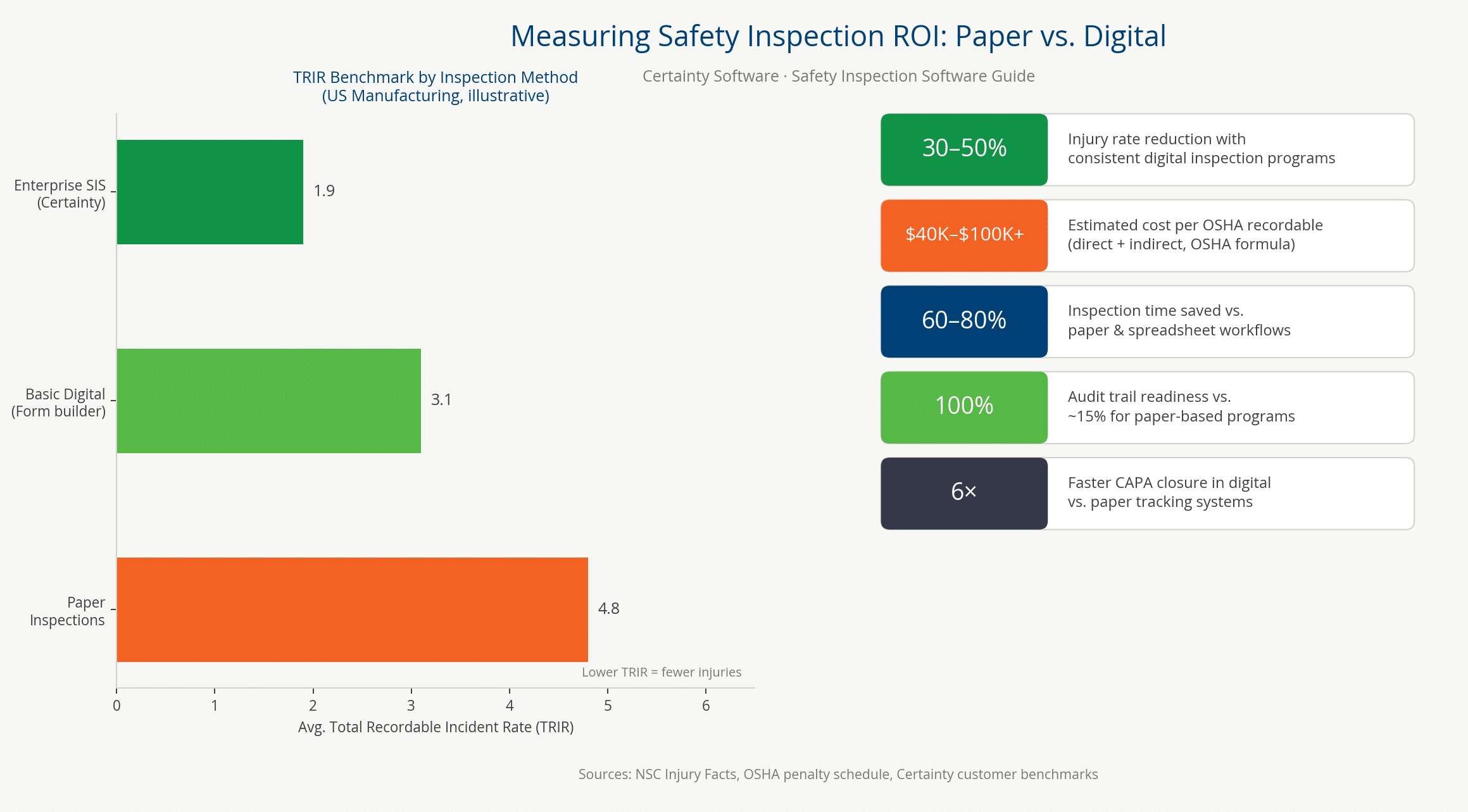
Three quantifiable outcomes drive the business case: reduced Total Recordable Incident Rate (TRIR), lower workers’ compensation costs, and avoidance of OSHA fines. Organizations using structured digital inspection programs report 30–50% reductions in workplace injuries versus paper-based approaches. TRIR — the most widely tracked lagging safety indicator — is calculated as (number of recordable incidents × 200,000) ÷ total hours worked. Safety inspection software directly reduces the numerator by driving corrective action closure before incidents occur. NSC Injury Facts (2024 estimate) puts the total cost of work injuries to U.S. employers at $181.4 billion annually. This covers wage and productivity losses, medical expenses, and administrative costs. Safety inspection software ranks among the highest-return EHS technology investments when measured against the hidden cost of failing workplace safety inspections.
TRIR and How Safety Inspection Software Reduces It
TRIR reduction is the key metric EHS directors use to demonstrate inspection program ROI to operational leadership and boards. The mechanism is direct: higher inspection frequency → more hazards found early → more CAPAs closed → fewer injuries → lower TRIR. Enterprise safety inspection software accelerates this cycle in three ways. First, it automates inspection scheduling so mandated inspections occur without manual tracking. Next, it reduces CAPA assignment delays through instant automatic assignment. Finally, it enforces CAPA closure verification, preventing findings from aging open indefinitely. The TRIR calculation is transparent and auditable. An organization with a declining TRIR trend correlated with rising inspection completion rates has built a defensible business case for continued EHS investment.
Leading Indicators That Inspections Generate
Leading indicators are the EHS metrics that predict future incident rates before incidents occur. Enterprise safety inspection software generates the most actionable leading indicators automatically. These include:
- Inspection completion rate — percentage of scheduled inspections completed on time.
- CAPA closure rate — percentage of open corrective actions resolved by their due date.
- CAPA aging — average number of days an open finding remains unresolved.
- Near-miss report frequency — near-miss events documented per month.
- BBS observation rate — behavioral safety observations completed per supervisor per month.
Insurance carriers, major customers, and investors increasingly require safety leading indicators as evidence of safety program quality. As a result, automated metric generation becomes a direct commercial value driver for enterprise organizations, not just a safety management benefit.
OSHA Fine Avoidance and the Regulatory Risk Calculation
The regulatory risk is concrete: OSHA’s maximum penalty for a willful violation is $165,514 per citation item as of 2025. A single OSHA inspection finding three willful violations — each a documentation failure — can generate a fine of nearly $500,000. In FY2024, OSHA conducted 34,696 federal workplace inspections covering 130 million workers. The best defense in a contested OSHA citation is a defensible audit trail. It must demonstrate that the organization conducted the required inspection, documented findings, and assigned corrective actions. Records must be verified, closed, and maintained in a searchable, producible format.
Organizations without enterprise-grade inspection software struggle to produce this documentation on short notice. Records are distributed across paper files, email chains, and disconnected spreadsheets, where spreadsheet errors in safety programs introduce additional regulatory exposure. A single prevented willful citation pays for several years of enterprise inspection software licensing.
Building the Internal Business Case for EHS Software Investment
EHS directors presenting a safety inspection software investment to a CFO should frame ROI in three dimensions:
- Risk avoidance — OSHA fine prevention, litigation exposure reduction, and insurance premium impact.
- Operational efficiency — labor hours saved on manual inspection tracking, report generation, and evidence assembly.
- Safety outcome improvement — TRIR reduction target, workers’ compensation trend, and days-away rate.
Risk avoidance is often the most compelling argument for financial decision-makers. A $165,514 willful violation fine, a six-figure workers’ compensation claim, or multi-million dollar lawsuit: each is a known, quantifiable risk. The software cost is insurance against each of those outcomes. Organizations seeking to benchmark their safety performance should combine TRIR tracking with the leading indicator dashboard that enterprise inspection software generates. Together, these data points create the multi-dimensional safety performance picture that boards and ESG stakeholders increasingly expect.
How Certainty Software Supports Enterprise Safety Inspection Programs
Certainty is enterprise-ready, web-based inspection management software. It lets EHS teams scale inspections across multiple sites — capturing evidence offline, routing findings into CAPA actions, and producing audit-ready reporting. Configurable user roles, SSO, OData feeds, and cloud-based accessibility keep every inspection, observation, and corrective action in a single centralized record. In addition, Certainty helps your organization stay compliant with OSHA and other regulatory requirements.
Why enterprise EHS teams choose Certainty
- Customizable, intelligent forms. Use pre-built safety inspection templates or create fully customizable checklists tailored to your sites, processes, and regulatory scope. Smart features such as GPS tracking, QR/barcode scanning, and conditional logic improve accuracy in the field.
- Offline-capable mobile inspections. Conduct inspections from desktop, mobile, or web — including underground, remote, or hazardous areas — with automatic syncing the moment connectivity returns.
- Automated CAPA workflows. Delegate corrective actions to the right stakeholders automatically. Monitor progress in real-time dashboards and ensure findings are tracked through to verified closure — closing the loop EHS leaders care about most.
- Real-time dashboards and Power BI analytics. Monitor safety performance with customizable dashboards and Microsoft Power BI reporting. Identify trends and root causes, and report consistent, comparable safety metrics across every site.
- Enterprise configurability. Configure user roles and access, integrate via OData feeds and pre-built connectors, and deploy with SSO in multiple languages. The platform is built for organizations running dozens or hundreds of sites.
- Inspection records that hold up to scrutiny. Attach photos, documents, and supporting evidence directly to inspection records — providing clear context and proof of safety compliance with regulatory requirements.
Where Certainty fits in your safety program
Certainty is the audit and inspection system of record — capturing evidence that supports your management system, regulatory obligations, and continuous-improvement reporting. Inspection data flows into the same platform regardless of program type. It supports Behavior Based Safety observations, jobsite safety inspections, PPE inspections, near miss reporting, and facility safety inspections. EHS directors gain a single source of truth across every site, shift, and program.
Measurable ROI
- 50+ hours saved per week by reducing administrative burden and streamlining safety audits.
- 100% audit participation with an intuitive mobile app that drives adoption among frontline teams.
- Pinpoint efficiency, compliance, and accuracy for data-driven safety decisions.
See Certainty’s Enterprise Safety Inspection Platform in Action
Built for multi-site manufacturers and contractors who need every inspection to produce defensible evidence.
Book a DemoKey Takeaways
- Safety inspection software creates timestamped, photo-documented, GPS-tagged records constituting defensible evidence under OSHA 29 CFR 1910 (General Industry) and 1926 (Construction).
- A defensible audit trail links every finding to a corrective action, owner, and verified closure date — distinguishing enterprise platforms from consumer apps.
- OSHA 29 CFR 1910 and 1926 embed mandatory inspection requirements across more than 800 individual standards. Enterprise safety inspection software converts these scattered requirements into scheduled, documented, trackable inspection events.
- Enterprise safety inspection software supports six types: routine inspections, FLHA assessments, equipment checks, BBS observations, pre-startup reviews (PSSR), and ISO 45001 audits. A single platform covers all six.
- The DuPont Bradley Curve shows organizations advancing from Reactive to Interdependent use inspection data as continuous-improvement intelligence — not archival compliance paperwork. Notably, BBS observation programs are the primary driver of this cultural transition.
- TRIR is directly reduced by increasing inspection frequency and CAPA closure speed. Organizations using structured digital inspection programs report 30–50% fewer workplace injuries than paper-based programs, according to published research.
- Enterprise EHS practitioners should prioritize OSHA/ISO template depth, offline mobile capability, multi-site dashboard reporting, defensible CAPA workflows, and vendor implementation track record.
- Certainty Software is purpose-built for multi-site manufacturing and construction enterprises — designed for field-level inspection defensibility, not a consumer app scaled up.
Frequently Asked Questions (FAQs)
What is safety inspection software?
Safety inspection software is a digital platform for enterprise EHS teams. It replaces paper checklists with timestamped, photo-documented, GPS-tagged records. These records constitute defensible evidence under OSHA 29 CFR 1910, 29 CFR 1926, and ISO 45001:2018 Clause 9 (Performance Evaluation) requirements. In addition, enterprise platforms support multi-site rollup dashboards, configurable templates, integrated CAPA workflows, and offline mobile capability.
What is EHS software and how does it differ from safety inspection software?
EHS software (Environment, Health and Safety software) is the broader management system. It covers environmental compliance, occupational health programs, and workplace safety. This includes incident management, training records, chemical inventory (SDS), industrial hygiene, and ISO 14001/45001 management system support. Safety inspection software is the field-execution module within EHS software, focused specifically on conducting inspections, capturing findings, and managing corrective actions. Certainty supports both — safety inspections feed directly into the broader EHS management system per ISO 45001 Clause 9 (Performance Evaluation) requirements.
Can safety inspection software work offline for field inspections?
Yes — enterprise platforms like Certainty support offline-capable mobile inspections with automatic sync when connectivity returns. Offline capability is critical for manufacturing floors with WiFi dead zones, remote construction sites, and oil and gas or pipeline operations. The mobile app must capture photo evidence, GPS, timestamp, and digital signature offline — with full feature parity, not a degraded read-only view.
How does safety inspection software improve OSHA compliance?
OSHA 29 CFR 1910 and 1926 embed hundreds of specific inspection requirements. These include daily scaffold inspections (1926.451), confined space pre-entry (1910.146), LOTO procedure verification (1910.147), and PSM Pre-Startup Safety Reviews (1910.119). Enterprise software converts these into scheduled, documented inspection events with photo evidence and CAPA workflows — creating the defensible audit trail OSHA requires. With maximum penalties of $165,514 per willful violation as of 2025, documented inspection records are the primary legal defense in enforcement proceedings.
What features does safety inspection software include?
Enterprise safety inspection software typically includes:
- Offline-capable mobile inspections with photo, GPS, timestamp, and signature capture
- Customizable OSHA-mapped checklist templates (29 CFR 1910 and 1926)
- Integrated CAPA workflows with root cause, assignment, and verified closure
- Near-miss and BBS observation modules
- Multi-site rollup dashboards and corrective action tracking
- ISO 45001 Clause 9 reporting
- Role-based access control for contractor credential management
The defining enterprise differentiator is the 6-element defensible audit trail — not the form-builder.
Who needs safety inspection software?
EHS directors, safety managers, compliance officers, and operations leaders at multi-site enterprises in manufacturing, construction, oil and gas, utilities, and logistics. Any organization subject to OSHA 29 CFR 1910 (general industry) or 1926 (construction) requirements needs a documented inspection system. The same applies to those pursuing ISO 45001 certification or managing large contractor populations under OSHA host-employer obligations. Paper checklists do not meet the defensible-evidence standard for contested enforcement, certification audits, or insurance underwriting.
What is construction safety inspection software?
Construction safety inspection software is a digital platform for documenting OSHA 29 CFR 1926 compliance requirements on active job sites. It covers scaffold inspections (1926.451), fall protection checks (1926.502), excavation inspections (1926.651), confined space permits, toolbox talk records, and corrective action workflows. It must support offline mobile capability for sites without reliable connectivity, and integrate contractor credential verification before allowing access to the worksite. Construction-specific templates are pre-mapped to 1926 sub-standards rather than general-industry 1910 templates.
What are the three types of safety audits?
The three types of safety audits are:
- Compliance audit — verifies conformance with external regulatory or certification standards (OSHA 29 CFR, ISO 45001).
- Program audit — evaluates whether internal safety program elements (HIRA, training, CAPA, BBS) are implemented as designed.
- Management system audit — a full ISO 45001 Clause 9 performance evaluation of the entire safety management system.
Safety inspection software provides the evidence package for all three audit types. Without it, auditors must reconstruct the trail from paper records.
How does safety audit software build an audit trail?
Every inspection finding is timestamped at capture, tagged with GPS location, and attached with photographic evidence. The inspector digitally signs each finding and links it to a corrective action with an assigned owner and verified closure date. This creates the 6-element defensible audit trail that survives regulatory scrutiny. Certainty’s standard: a true audit trail must hold up under OSHA enforcement, ISO 45001 audit, or litigation discovery — not merely be complete.
What is ISO 45001 and how does it relate to safety audit software?
ISO 45001:2018 governs occupational health and safety (OH&S) management systems. It requires documented inspection records under Clause 9 (Performance Evaluation) and hazard identification under Clause 6 (Planning). Safety audit software automates evidence collection, CAPA management, and audit-readiness reporting for ISO 45001 compliance — records certification auditors require. Adopted by over 45,000 organizations globally, ISO 45001 replaced OHSAS 18001 in March 2018 and is now the dominant enterprise EHS framework worldwide.
You Might Also Be Interested In
- Safety Inspections Product Overview
- The DuPont Bradley Curve: Understanding Safety Culture Maturity
- HIRA: Hazard Identification & Risk Assessment Guide
- Layered Process Audits (LPA) for Manufacturing
- 9 Common Safety Observation Examples
Glossary of Safety Inspection Terms
The following definitions provide reference-grade explanations for the core terms used throughout this guide. Each term corresponds to a schema DefinedTerm entry in the page’s structured data, supporting LLM extraction and Google rich-result eligibility.
Software and Evidence Concepts
Platform and Evidence Standards
- Safety Inspection Software
- A digital platform for enterprise EHS teams to plan, conduct, document, and act on workplace safety inspections. It replaces paper checklists with timestamped, photo-documented, GPS-tagged records that constitute defensible evidence under applicable OSHA and ISO 45001 requirements. Enterprise safety inspection software includes offline-capable mobile apps, configurable regulatory checklists, integrated CAPA workflows, and multi-site rollup dashboards.
- Defensible Evidence
- The standard for safety inspection documentation defined by Certainty Software: inspection records that are not merely complete but legally defensible. Able to demonstrate due diligence in the language of OSHA enforcement, ISO 45001 Clause 9 audit documentation, and litigation discovery. A defensible evidence record has six elements: timestamp, photo, GPS location, digital signature, corrective action with owner and due date, and closure verification.
Workflow and Analysis Methods
- CAPA (Corrective and Preventive Action)
- A structured workflow for addressing non-conforming findings identified during safety inspections or audits. The CAPA lifecycle includes: finding identification, root cause analysis, action assignment (owner and due date), escalation if overdue, completion evidence, and verified closure. ISO 45001 Clause 10 requires documented corrective action processes that address root causes, not merely symptoms. Enterprise safety inspection software automates and enforces the full CAPA lifecycle.
- JSA (Job Safety Analysis / Job Hazard Analysis)
- A JSA is a systematic process for analyzing each step of a job task for specific hazards. It is developed in advance for planned work activities and used to establish safe work procedures and select appropriate controls. Also known as a Job Hazard Analysis (JHA). JSAs are referenced in OSHA’s guidance on controlling workplace hazards and are a foundational tool in construction and manufacturing safety programs. Enterprise inspection software enables JSAs to be completed, stored, and linked to related inspection records and HIRA cycles.
Regulatory Standards and Mandates
OSHA Federal Regulations
- OSHA 29 CFR 1910
- The U.S. federal standard governing occupational safety and health in general industry, codified at 29 CFR Part 1910. It contains more than 800 individual sub-standards. Many mandate specific periodic inspection requirements, including 1910.147 (Lockout/Tagout), 1910.146 (Confined Space Entry), 1910.119 (Process Safety Management), and 1910.132 (PPE).
- OSHA 29 CFR 1926
- The United States federal regulatory standard governing occupational safety and health in construction industry workplaces, codified at 29 CFR Part 1926. Key sub-standards with mandatory pre-shift or periodic inspection requirements include 1926.502 (Fall Protection), 1926.451 (Scaffolding), 1926.651 (Excavations), and 1926.1412 (Cranes and Derricks). Pre-shift documentation requirements are among the most frequently cited OSHA violations in the construction sector.
International Standards and Specific Procedures
- ISO 45001
- The international standard for Occupational Health and Safety Management Systems (OHSMS), published by ISO in 2018 and adopted by over 45,000 organizations globally. ISO 45001 replaced OHSAS 18001 in March 2018. Clause 9 (Performance Evaluation) requires organizations to conduct, document, and retain records of internal audits and inspections as part of continual improvement. Certification requires an evidence package that enterprise inspection software can generate automatically.
- LOTO (Lockout/Tagout)
- The safety procedure governed by OSHA 29 CFR 1910.147. It requires workers to isolate and de-energize machinery before performing maintenance or service. The hazardous energy types covered include electrical, mechanical, hydraulic, pneumatic, chemical, thermal, and gravitational. OSHA 1910.147 requires annual inspection of each energy control (lockout/tagout) procedure by an authorized employee, with the results certified in writing. LOTO compliance is one of the most frequently cited OSHA violations in general industry.
Hazard and Risk Assessment Methods
- HIRA (Hazard Identification and Risk Assessment)
- A systematic process for identifying workplace hazards, assessing likelihood and consequence of harm, and determining controls using the hierarchy of controls. HIRA is required by ISO 45001 Clause 6.1.2 as a planning activity. Inspection findings feed directly into the HIRA risk register, ensuring recurring hazards are escalated from operational findings to strategic risk decisions. Enterprise inspection software links individual findings to the HIRA cycle automatically.
- FLHA (Field Level Hazard Assessment)
- A pre-task safety inspection completed by workers before beginning a high-risk activity, identifying site-specific hazards and confirming controls are in place. FLHAs are mandatory in the Canadian oil and gas sector and are widely adopted in construction, utilities, and heavy manufacturing. A JSA is developed in advance for a generic task. By contrast, an FLHA is a real-time assessment of conditions at a specific location on a specific day. It must be documented with the worker’s signature, timestamp, and identified hazards.
Startup Reviews and Behavior Programs
- PSSR (Pre-Startup Safety Review)
- A pre-startup inspection required by OSHA 29 CFR 1910.119 (Process Safety Management) before commissioning new or modified equipment handling highly hazardous chemicals. A PSSR must confirm that construction and equipment conform to design specifications, safety procedures are in place, and initial startup is safe. PSSR records are among the most scrutinized documents during OSHA PSM compliance audits.
- BBS (Behavior-Based Safety)
- BBS uses structured observation of worker behaviors to identify and correct at-risk behaviors before they result in incidents. It focuses on behavior rather than physical conditions alone. BBS programs train supervisors and peer observers to complete behavioral observation checklists. They provide immediate coaching feedback and document observations in a structured record. The American Society of Safety Professionals (ASSP) recognizes BBS programs as a leading indicator of safety culture maturity. BBS observation programs are a key driver of advancement along the DuPont Bradley Curve from Reactive to Interdependent safety culture.
Ready to Build a Defensible Safety Inspection Program?
A mobile-first, OSHA-mapped enterprise platform that eliminates paper checklists, enforces evidence capture, and connects every finding to verified CAPA closure.
Book a Demo


