AUTOMATION FEATURES

Strengthen defensible evidence with advanced tools for enterprise level teams

If audits and inspections are how you run the business, automation should help you capture evidence in context, surface risk early, and drive verified closure so your program holds up in real audits and operations. Certainty’s automation add-ons are designed to support that standard. They extend a system of record that scales across sites, suppliers, and teams.
Offline + mobile capture • Evidence attachments • Actions & workflows • Power BI reporting • SSO & enterprise governance

How does Certainty automation stay audit-ready?

Certainty automation is built to support human decisions, not replace them. That means every automated output includes the controls needed to maintain defensibility.
Confidence scoring on automation-generated outputs, so reviewers can verify before accepting
Configurable thresholds, so you decide what requires review, evidence, or follow-up
An auditable trail of what was suggested, what was verified, and what changed over time
Standardization so data stays comparable across sites, regions, and suppliers
Support for ESG audit workflows, backed by the same evidence-grade standards as safety or quality programs

What is Vision and what does it do in an inspection workflow?

Vision helps reviewers move faster while protecting defensibility. It analyzes photo, video, and document attachments and suggests responses to inspection and audit questions. Results are paired with confidence scoring so teams can validate before they become part of the record.

Vision is best for:

Inspections with photo or video evidence
Document-heavy audits where reviewers spend time re-reading attachments
Programs where you need higher confidence in what is being submitted and what is not

What Vision enables:

Reduced manual rework
Spend less time transcribing evidence into fields.
Better data integrity
Enforce confidence thresholds and review rules before data is accepted.
More defensible evidence
Connect answers directly to the supporting attachment for context.

What is Insights and how does it help teams act on findings faster?

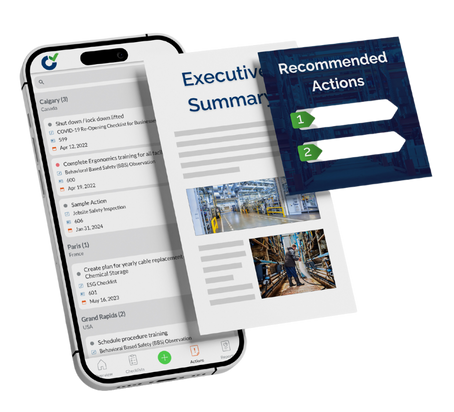
Insights turns completed inspections into decision-ready outputs. It generates configurable summaries, highlights key risks, detects anomalies, and produces recommendations so leaders can act without wading through every submission.

Insights is best for:

Weekly or monthly audit programs where leaders need a fast, reliable readout
High-volume submissions where trend signals get buried
Teams trying to close the gap between findings logged and issues resolved

What Insights provides:

Executive summaries
Short, configurable summaries that are easy to review and share with leadership.
Risk identification
Highlights patterns and high-priority risks across submissions.
Anomaly detection
Flags suspicious or low-quality submissions to help deter pencil whipping.
Actionable recommendations
Suggestions that can feed follow-up actions and CAPA workflows.
CAPA (Corrective and Preventive Action) is the workflow that ensures issues are fixed, verified, and prevented from recurring. 
UPCOMING FEATURE

What will Analytics add?

Insights is designed to roll completed audits and inspections into enterprise-wide risk summaries, trends, predictive analytics, comparisons, and benchmarking so leaders can spot where risk is rising and where performance is drifting. While subject to change as the product evolves, planned capabilities include the following. 

Critical risk mapping, trend analysis, benchmarking, comparative analysis, and deviation alerts
Auditor performance checks aimed at identifying low-quality submissions
Enterprise-wide views that connect safety, quality, supplier, and ESG audit data in one reporting layer
Who is this for?
icon-safety-inspections

Safety and EHS teams

How do you prove hazards were fixed and not just found?

EHS (Environmental Health and Safety) leaders do not get credit for more inspections. They get credit for defensible evidence and verified closure at enterprise scale. Automation helps when you need to accomplish the following:
Faster review without sacrificing trust in what was captured
Closing the CAPA trust gap (is the fix real, verified, and durable?)
Standardizing inspections across sites, shifts, and languages
Explore safety inspections
Outcomes
Comparable safety data across sites so you can prioritize the right work
Fewer repeat issues through prevention via verified closure
Stronger audit defensibility through evidence captured in context and reviewable decisions
Supplier Compliance icon

Supply Chain and Supplier Compliance teams

How do you get usable evidence from suppliers at scale?

Supply chain compliance teams are buried in attachments, email, and inconsistent supplier submissions. Automation should help create comparable supplier evidence and reduce time spent chasing basics. Automation helps when you face the following challenges.
Supplier audits and SAQs create more documents than insight
You need faster triage of high-risk responses
You need a clearer record of what was submitted, what is missing, and what was verified
Explore supply chain compliance
Outcomes

Reduced friction in evidence review through less manual extraction
Earlier risk detection across suppliers and regions
More consistent reporting for due diligence and remediation
icon-quality-inspections

Quality Audit teams

How do you standardize audits across shifts without living in spreadsheets?

Quality teams often run critical programs in Excel, email, and shared folders, then lose comparability when auditors interpret questions differently. Automation helps when you need:
Scaling LPAs (Layered Process Audits) across sites and shifts
ISO 9001 or VDA 6.3 audit outputs that are consistent & reviewable
Earlier signals on deviation trends and audit quality
Explore quality audits
Outcomes
Standardized execution with more consistent inputs
Better comparability across shifts and sites
Less manual reporting and back-and-forth on incomplete audits

“We use the AI features in our weekly and monthly safety audits. It has changed how we approach evidence review.” 

— Health and Safety Officer, NCB Group

Set it so you don't forget it.

Certainty offers a range of notification features to ensure the follow through, completion and closure of all actions and tasks. These features include:
Configurable notifications and reminders for scheduled audits and inspections
Configurable and automated notifications based on the results of completed audits and inspections
Automated creation and delegation of corrective actions based on the result of completed audits and inspections
Configurable and automated escalation and notifications triggered by overdue actions

FAQs about Automation Features in Certainty Software

Certainty is designed as an evidence-grade system of record. It captures evidence in context, supports verified closure, and produces audit-ready reporting across sites and suppliers. A digital checklist proves completion. Certainty proves what was verified, what evidence backs it, and what was resolved.

No. Vision is designed to assist review by suggesting responses based on attachments and providing confidence scoring. Teams verify before accepting results. The auditor or inspector remains the decision-maker.

They make automation outputs reviewable. Teams can set thresholds and rules for when items must be reviewed or escalated, so results are not blindly accepted. The confidence score creates a traceable record of what was automated and what was human-verified.

Insights summarizes findings, highlights key risks, and can suggest recommended follow-up. That means CAPA (Corrective and Preventive Action) work starts from clearer prioritization rather than raw data. It supports the shift from findings recorded to issues resolved.

Yes. Anomaly detection flags suspicious or low-quality submissions for follow-up and reinforces evidence-based completion patterns. Over time, this discourages superficial audit completion because the system surfaces inconsistencies.

Analytics is currently in development. Planned capabilities include enterprise-wide risk summaries, trend analysis, benchmarking, and deviation alerts. Specific features and timelines are subject to change.

Yes. The same automation capabilities (Vision, Insights, and eventually Analytics) apply to sustainability and ESG audit workflows. Sustainability claims are only credible when the data is auditable and the follow-through is demonstrable. Automation helps maintain that standard.

See how automation works in your environment

Get defensible evidence, verified closure, and comparable data at enterprise scale.