
Summary: Safety and compliance software must turn collected data into reports that show trends, open actions, recurring hazards, and audit readiness across sites. Strong reporting requirements include flexible dashboards, drill-down analysis, scheduled outputs, and clear visibility into corrective action status so EHS teams can act quickly. For enterprise buyers, weak reporting limits the value of every inspection and audit, while strong reporting turns safety data into operational control.
When evaluating enterprise safety software, reporting requirements are one of the most critical factors to assess. A platform with excellent data collection but weak reporting will leave EHS managers unable to act on the information they gather. Consequently, this limits OSHA compliance readiness and slows corrective action closure. Moreover, it leaves incident trends invisible across the organization.
This post is part of our 10-part series on evaluating enterprise-level software. We cover topics ranging from security and data collection to reporting requirements, implementation resources, and pricing models — everything you need to ensure your next enterprise software deployment is a success. You can also download the entire Evaluating Enterprise-level Software whitepaper here.
_____________________________________
Last week we looked at the importance of discovering whether the new enterprise software you’re considering can serve multiple purposes. Does the solution you’re evaluating meet these reporting requirements? Let’s move on to the reporting capabilities of the software you’re evaluating.
Without a doubt, reporting is one of the most important factors when choosing enterprise-level safety and compliance software. Many platforms offer sophisticated data entry and a polished user interface. However, they deliver only limited or inflexible reporting. For EHS and Safety teams operating under ISO 45001 or OSHA recordkeeping requirements (29 CFR Part 1904), inadequate reporting directly undermines regulatory audit readiness.
Furthermore, not all software solutions are created equal. One of the most important factors to assess is whether the solution provides you — and all users across your business — with the data they need. Specifically, this data should improve compliance, safety performance, and enterprise risk management. In contrast, poor visibility into inspection completion rates and action closure times can expose organizations to regulatory penalties.
Key Reporting Requirements to Evaluate in Safety & Compliance Software
Consider the following when it comes to your reporting requirements:
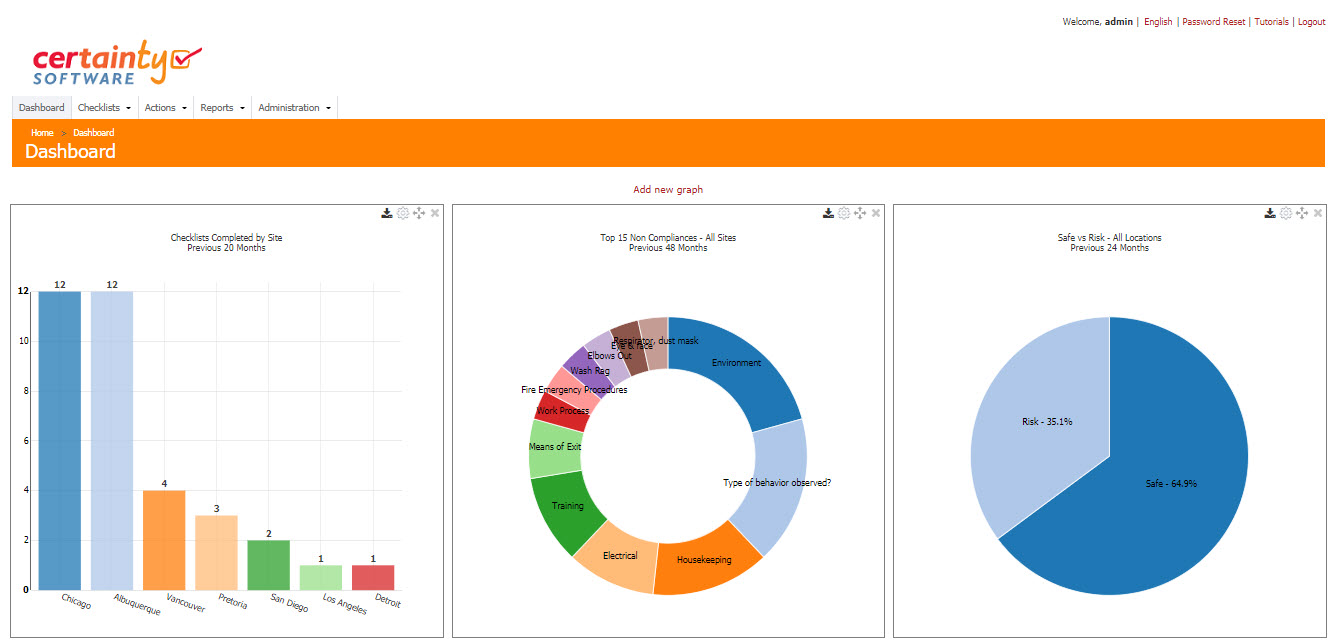
- Custom dashboards: Can you create user-specific dashboards with your own KPIs, safety metrics, analytics, and graphs — or are you limited to pre-built, canned reports that don’t reflect your operational structure? EHS Managers and Safety Directors need real-time visibility into leading and lagging indicators, not static snapshots.
- Cross-site reporting: Can you report across all audit and inspection data — regardless of where in the business it was entered — to get key safety metrics for your entire organization in a single consolidated view? This is essential for multi-site operations managing OSHA compliance and ISO 45001 performance monitoring across divisions, regions, or facilities.
- Built-in business intelligence: Does the solution include integrated business intelligence tools (such as Microsoft Power BI, Tableau, or a native analytics engine), or do you need to export raw data and rely on external third-party tools to generate the enterprise-level metrics you need? Manual exports introduce delays that slow corrective action response times and create gaps in audit readiness.

- Enterprise roll-up and drill-through reporting: Does the solution support enterprise-wide data roll-up and drill-through capability? Can you report safety metrics, inspection analytics, and compliance KPIs by:
- Site (e.g. location, project, store, lab, facility, construction site)
- Site Groups (e.g. Business Units, Divisions, Regions, Departments)
- User and User Groups (e.g. Safety Managers, Contractors, Shifts, Crews)
- Checklist type (i.e. safety audit, workplace inspection, BBS observation, OSHA recordable review)
- Question sets and individual question answers
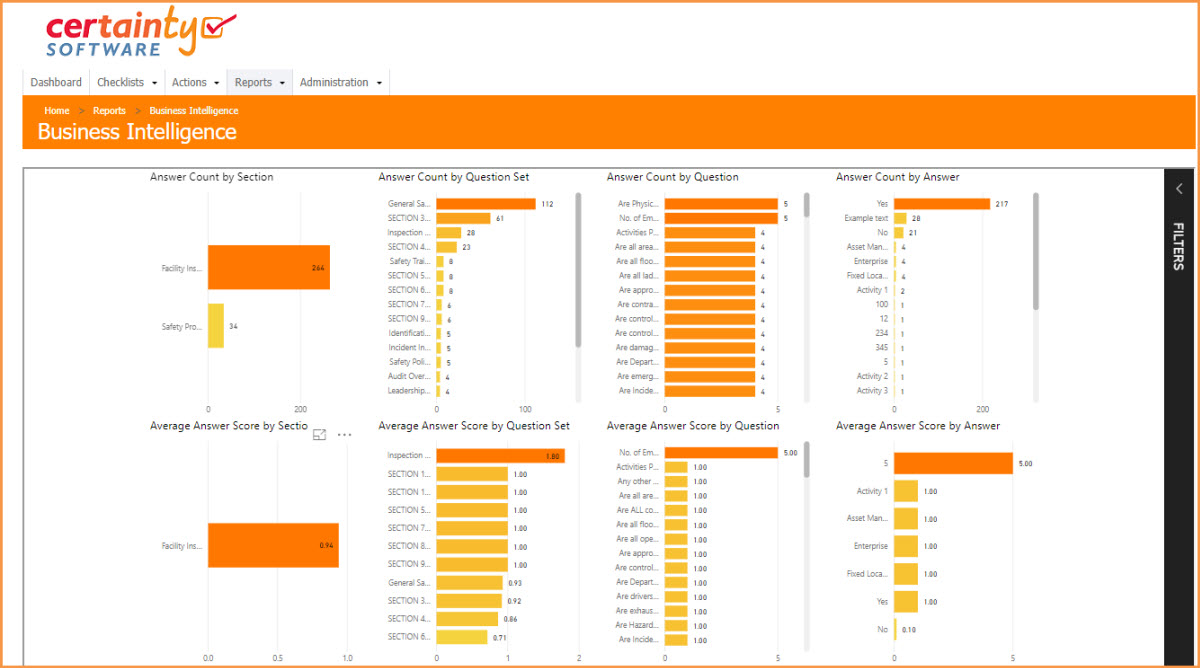
- Custom report development: If the platform’s standard reporting tools don’t fully meet your unique requirements — for example, custom OSHA 300 log formats or executive safety scorecards — can the solution provider build custom reports for you? Organizations with complex regulatory needs should confirm this capability before committing.
- Automated report distribution: Does the solution offer automated report subscription services? Specifically, can it email scheduled reports to stakeholders who are not regular users of the system — such as Executive Managers, C-suite leaders, or external auditors? Automated distribution ensures that decision-makers always have current safety data without manual intervention.
Why Reporting Requirements Matter for OSHA Compliance and Safety Performance
For organizations subject to OSHA recordkeeping (29 CFR Part 1904) or ISO 45001 performance evaluation, the ability to generate accurate, timely reports is not a nice-to-have. In fact, it is a regulatory obligation. Therefore, the right reporting infrastructure enables EHS teams to track Total Recordable Incident Rate (TRIR) and monitor inspection completion rates. Additionally, it helps identify hazard trends before they escalate. Most importantly, it demonstrates audit readiness to regulators and internal stakeholders alike.
Decentralized or siloed safety data is a common pain point for multi-site organizations. As a result, it becomes nearly impossible to produce reliable enterprise-level safety metrics. However, a platform that consolidates inspection, audit, and incident data in one place solves this problem. Specifically, flexible reporting across all dimensions of your operation gives Safety Directors the visibility they need. Ultimately, this drives continuous safety improvement across the entire organization.
Frequently Asked Questions (FAQs)
What reporting features should safety and EHS software include?
Effective safety and EHS software should include customizable dashboards and cross-site roll-up reporting. Additionally, it needs drill-through analytics by site and user group. Furthermore, it should offer built-in or integrated business intelligence tools. It should also provide automated report scheduling and distribution. Most importantly, it needs the ability to generate custom reports for unique regulatory or operational reporting requirements.
How does reporting in safety software support OSHA compliance?
Safety software with strong reporting capabilities helps organizations meet OSHA recordkeeping requirements (29 CFR Part 1904). Specifically, it centralizes incident data and automates OSHA 300/301 log generation. Moreover, it tracks TRIR and other lagging indicators. As a result, it produces audit-ready documentation on demand. Consequently, this reduces the risk of recordkeeping violations and improves regulatory inspection outcomes.
What is enterprise-level roll-up reporting in EHS software?
Enterprise-level roll-up reporting aggregates safety, inspection, and audit data from all sites, business units, and user groups into a single consolidated view. Therefore, it allows Safety Directors and EHS Managers to see organization-wide compliance performance. Additionally, they can drill down into specific locations, teams, or inspection types. As a result, they can identify root causes and prioritize corrective actions more effectively.
Next in our series, we’ll explore the language requirements of your business and why multilingual capability matters in enterprise safety software deployments.



